> ## Documentation Index
> Fetch the complete documentation index at: https://docs.priorlabs.ai/llms.txt
> Use this file to discover all available pages before exploring further.
# TabPFN Skill for Claude
The TabPFN Prediction Skill teaches Claude how to run classification and regression predictions on your tabular data — CSVs, spreadsheets, or tables pasted directly into chat — without writing any ML code. Instead of manually calling MCP tools and formatting parameters, you describe what you want in natural language and Claude handles the rest.
[Claude Skills](https://docs.anthropic.com/en/docs/claude-code/skills) are markdown instruction files that extend what Claude can do. This skill gives Claude a structured playbook for working with the [TabPFN MCP server](/agentic/mcp): it knows which tools to call, validates your data before making requests, confirms task details with you, and handles edge cases like missing values or mismatched columns.
Get TabPFN Prediction Skill here
## Prerequisites
Before installing the skill, make sure you have:
* A **Prior Labs account** — [sign up at ux.priorlabs.ai](https://ux.priorlabs.ai) if you don't have one
* **TabPFN MCP server configured** in your Claude client — follow the [MCP setup guide](/agentic/mcp)
* **Claude Code** installed or **Claude Desktop** on a Pro, Max, Team, or Enterprise plan
## How it works
When you ask Claude to predict outcomes on tabular data, the skill activates and guides Claude through a structured workflow:
1. **Confirms details with you** — target column, task type (classification or regression), and train/test split. Claude won't guess these.
2. **Validates your data** — catches issues that would cause errors (missing targets, column mismatches, duplicate column names) while leaving things TabPFN handles natively alone (missing feature values, mixed types, unnormalized numerics).
3. **Calls the right MCP tools** — `fit_and_predict` for inline tables pasted into chat, `upload_dataset` followed by `fit_and_predict_from_dataset` for CSV files, or `predict` to reuse a previously fitted model on new data.
4. **Returns results** — predictions, class probabilities, or regression estimates, formatted for your context.
Without the skill, Claude can still use the TabPFN MCP tools directly, but it won't know the optimal workflow, data validation rules, or how to handle edge cases like high-cardinality categoricals or class imbalance. The skill encodes this domain knowledge so every prediction follows best practices.
The skill activates automatically when you use phrases like "predict X from this data", "classify these rows", "estimate", "forecast", or mention TabPFN. In Claude Code, you can also invoke it directly with `/predicting-with-tabpfn`.
## Install the skill
1. Download the [`SKILL.md`](https://raw.githubusercontent.com/dianaprior/table-predictions-skill/main/.claude/skills/SKILL.md) file from the repository.
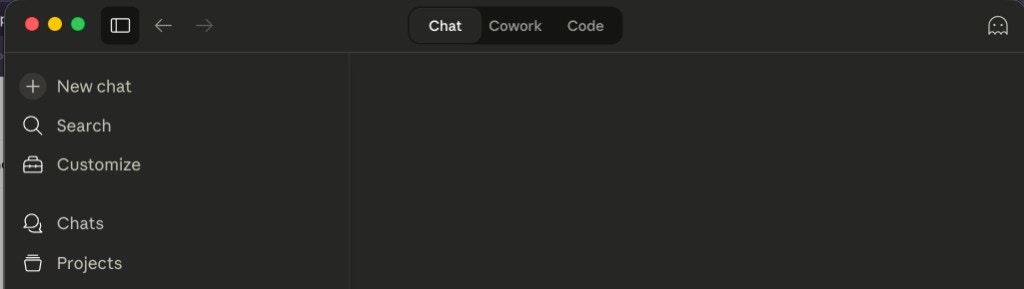
2. Open the sidebar and click **Customize**.
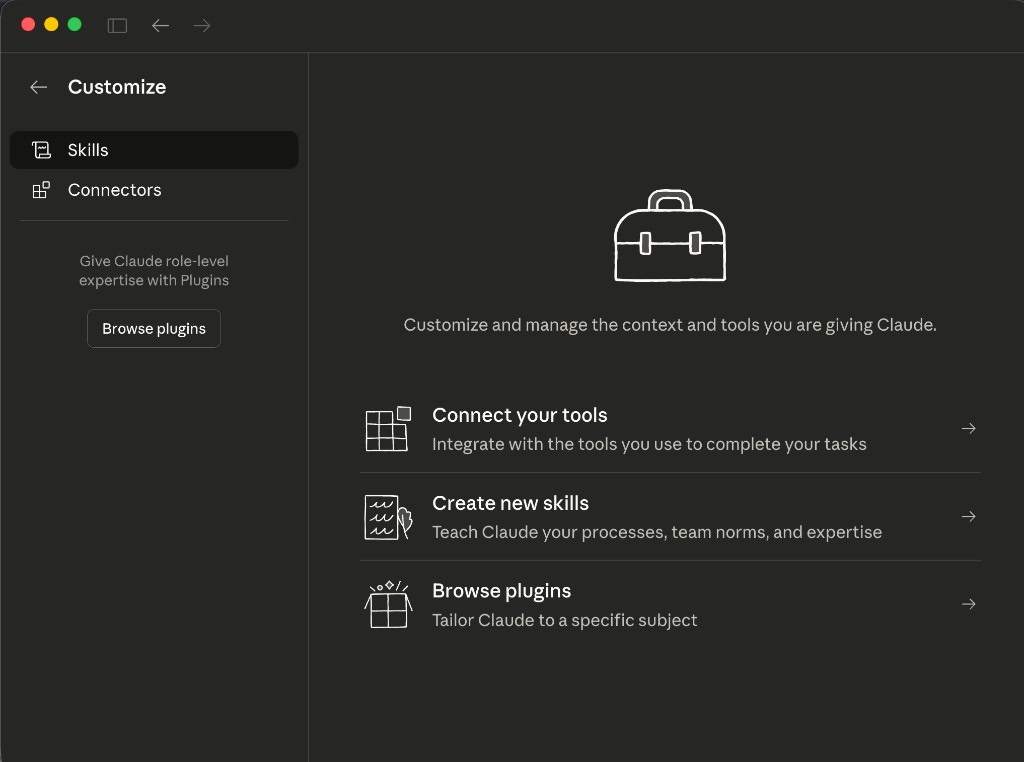
 3. Click **Skills** in the left panel.
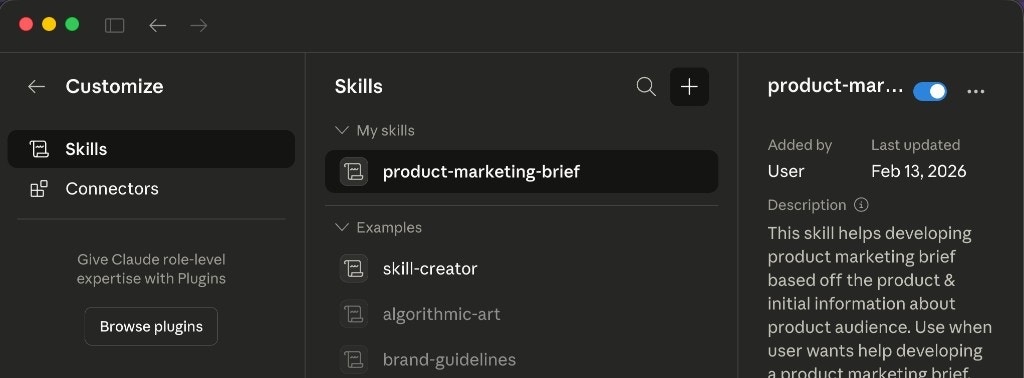
 4. Click the **+** button at the top of the skills list.
 5. Select **Upload skill** from the dropdown.
6. Select the `SKILL.md` file you downloaded in step 1.
The skill should appear under **My skills** once uploaded.
The skill is a single [`SKILL.md`](https://github.com/dianaprior/table-predictions-skill/blob/main/.claude/skills/SKILL.md) file placed in a `.claude/skills/` directory. Install it globally (available across all projects) or locally (for a single project).
Install globally:
```bash theme={null}
mkdir -p ~/.claude/skills/predicting-with-tabpfn
curl -o ~/.claude/skills/predicting-with-tabpfn/SKILL.md \
https://raw.githubusercontent.com/dianaprior/table-predictions-skill/main/.claude/skills/SKILL.md
```
Or install for a single project:
```bash theme={null}
mkdir -p .claude/skills/predicting-with-tabpfn
curl -o .claude/skills/predicting-with-tabpfn/SKILL.md \
https://raw.githubusercontent.com/dianaprior/table-predictions-skill/main/.claude/skills/SKILL.md
```
Verify the skill is loaded by starting Claude Code and asking:
```
What skills are available?
```
You should see `predicting-with-tabpfn` in the list. You can also invoke it directly with `/predicting-with-tabpfn`.
## Allow network access
The TabPFN MCP server runs remotely at `api.priorlabs.ai`. When Claude calls TabPFN tools, it needs permission to make outbound network requests to this domain.
When Claude Desktop runs code in its local coding environment, network access is restricted by default. To allow connections to the TabPFN API:
1. Open **Settings** in the sidebar
2. Enable **Code execution** if you haven't already
3. Under **Network egress**, toggle **Allow network egress** on
4. Add `api.priorlabs.ai` to the allowed domains list
Claude Desktop will also prompt you to authorize MCP tool usage the first time. Accept the prompt to allow TabPFN predictions.
On Team and Enterprise plans, an admin may need to configure the network allowlist. Domains like `github.com` and `pypi.org` are allowed by default, but `api.priorlabs.ai` must be added explicitly.
The first time Claude uses a TabPFN MCP tool, it will prompt you to approve the network request. You can allow it once for the current session or permanently.
To pre-approve all TabPFN MCP tools so Claude won't prompt each time:
```bash theme={null}
claude permissions allow mcp__tabpfn
```
## Make your first prediction
Once the MCP server is configured and the skill is installed, start a conversation with Claude and try one of the examples below.
#### Inline data
Paste a small table directly into chat:
```
Here's my dataset. Predict the "outcome" column.
| age | income | credit_score | outcome |
|-----|--------|-------------|----------|
| 25 | 50000 | 680 | approved |
| 45 | 120000 | 750 | approved |
| 33 | 35000 | 580 | denied |
| 52 | 90000 | 710 | approved |
| 28 | 42000 | 620 | denied |
| 38 | 75000 | 695 | |
| 47 | 105000 | 720 | |
```
Claude will:
1. Identify `outcome` as the target column
2. Confirm this is a classification task
3. Use rows with filled targets as training data, empty rows as test data
4. Call the TabPFN MCP tools and return predictions for the missing rows
#### CSV file
Point Claude to files in your project, or drop them directly into the chat:
```
I have train.csv and test.csv in the data/ folder.
Predict the "target" column using the training set.
```
Claude will upload both files to the TabPFN server, fit a model on the training data, and return predictions for the test set.
## What you can do
| Capability | Details |
| --------------- | ------------------------------------------------------------- |
| Classification | Binary or multi-class with optional probability output |
| Regression | Continuous values with mean, median, mode, or quantile output |
| Inline data | Paste tables directly into chat for quick predictions |
| File-based data | CSV files for larger datasets |
| Re-prediction | Reuse a fitted model on new data without re-training |
5. Select **Upload skill** from the dropdown.
6. Select the `SKILL.md` file you downloaded in step 1.
The skill should appear under **My skills** once uploaded.
The skill is a single [`SKILL.md`](https://github.com/dianaprior/table-predictions-skill/blob/main/.claude/skills/SKILL.md) file placed in a `.claude/skills/` directory. Install it globally (available across all projects) or locally (for a single project).
Install globally:
```bash theme={null}
mkdir -p ~/.claude/skills/predicting-with-tabpfn
curl -o ~/.claude/skills/predicting-with-tabpfn/SKILL.md \
https://raw.githubusercontent.com/dianaprior/table-predictions-skill/main/.claude/skills/SKILL.md
```
Or install for a single project:
```bash theme={null}
mkdir -p .claude/skills/predicting-with-tabpfn
curl -o .claude/skills/predicting-with-tabpfn/SKILL.md \
https://raw.githubusercontent.com/dianaprior/table-predictions-skill/main/.claude/skills/SKILL.md
```
Verify the skill is loaded by starting Claude Code and asking:
```
What skills are available?
```
You should see `predicting-with-tabpfn` in the list. You can also invoke it directly with `/predicting-with-tabpfn`.
## Allow network access
The TabPFN MCP server runs remotely at `api.priorlabs.ai`. When Claude calls TabPFN tools, it needs permission to make outbound network requests to this domain.
When Claude Desktop runs code in its local coding environment, network access is restricted by default. To allow connections to the TabPFN API:
1. Open **Settings** in the sidebar
2. Enable **Code execution** if you haven't already
3. Under **Network egress**, toggle **Allow network egress** on
4. Add `api.priorlabs.ai` to the allowed domains list
Claude Desktop will also prompt you to authorize MCP tool usage the first time. Accept the prompt to allow TabPFN predictions.
On Team and Enterprise plans, an admin may need to configure the network allowlist. Domains like `github.com` and `pypi.org` are allowed by default, but `api.priorlabs.ai` must be added explicitly.
The first time Claude uses a TabPFN MCP tool, it will prompt you to approve the network request. You can allow it once for the current session or permanently.
To pre-approve all TabPFN MCP tools so Claude won't prompt each time:
```bash theme={null}
claude permissions allow mcp__tabpfn
```
## Make your first prediction
Once the MCP server is configured and the skill is installed, start a conversation with Claude and try one of the examples below.
#### Inline data
Paste a small table directly into chat:
```
Here's my dataset. Predict the "outcome" column.
| age | income | credit_score | outcome |
|-----|--------|-------------|----------|
| 25 | 50000 | 680 | approved |
| 45 | 120000 | 750 | approved |
| 33 | 35000 | 580 | denied |
| 52 | 90000 | 710 | approved |
| 28 | 42000 | 620 | denied |
| 38 | 75000 | 695 | |
| 47 | 105000 | 720 | |
```
Claude will:
1. Identify `outcome` as the target column
2. Confirm this is a classification task
3. Use rows with filled targets as training data, empty rows as test data
4. Call the TabPFN MCP tools and return predictions for the missing rows
#### CSV file
Point Claude to files in your project, or drop them directly into the chat:
```
I have train.csv and test.csv in the data/ folder.
Predict the "target" column using the training set.
```
Claude will upload both files to the TabPFN server, fit a model on the training data, and return predictions for the test set.
## What you can do
| Capability | Details |
| --------------- | ------------------------------------------------------------- |
| Classification | Binary or multi-class with optional probability output |
| Regression | Continuous values with mean, median, mode, or quantile output |
| Inline data | Paste tables directly into chat for quick predictions |
| File-based data | CSV files for larger datasets |
| Re-prediction | Reuse a fitted model on new data without re-training |