> ## Documentation Index
> Fetch the complete documentation index at: https://docs.priorlabs.ai/llms.txt
> Use this file to discover all available pages before exploring further.
# Interpretability
> Explain TabPFN predictions with Shapley values, feature interactions, and partial dependence plots.
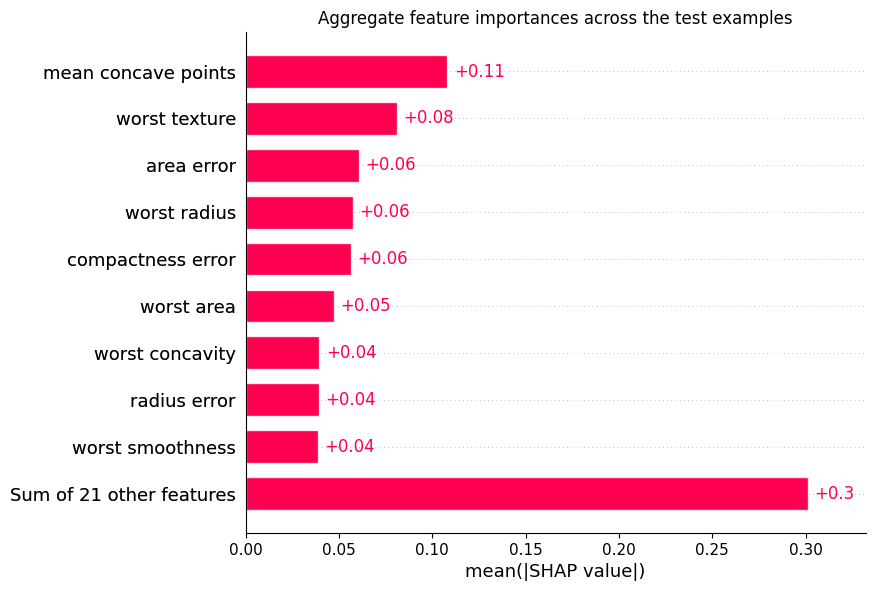
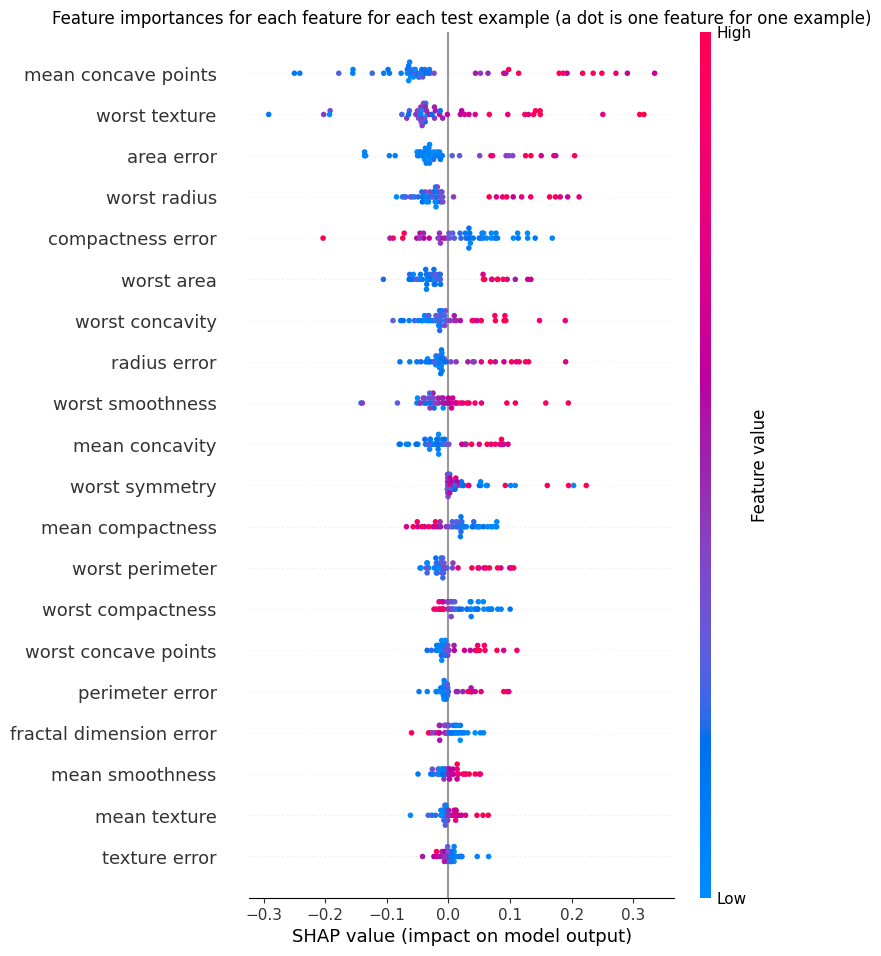
The Interpretability Extension adds dedicated support for [shapiq](https://github.com/mmschlk/shapiq), along with convenience wrappers for sklearn's built-in interpretability tools, and for plotting with the shap library (see [here](https://github.com/PriorLabs/tabpfn-extensions/blob/main/examples/interpretability/shap_example.py)).
Shapley values explain a single prediction by attributing the prediction's deviation from the baseline (mean prediction) to individual features. They provide a consistent, game-theoretic measure of feature influence. Mathematically, each Shapley value represents the marginal contribution of a feature across all possible feature combinations.
This can be used to:
* See which features drive model predictions.
* Compare feature importance across samples.
* Detect feature interactions.
* Debug unexpected model behavior.
## Why TabPFN is Well-Suited for Interpretability
TabPFN produces smooth, well-calibrated predictions that make post-hoc explanations more stable and meaningful. Because it is a foundation model pretrained on synthetic data, it generalizes without overfitting to individual training samples — so feature attributions reflect genuine patterns.
TabPFN follows the scikit-learn estimator API (`fit`, `predict`, `predict_proba`), which means it works out of the box with most interpretability tools in the sklearn ecosystem — partial dependence plots, permutation importance, and any other method that accepts a sklearn-compatible estimator. No wrappers or adapters needed.
***
## Installation
```bash theme={null}
pip install tabpfn "tabpfn-extensions[interpretability]"
```
This installs `shapiq` and the other dependencies needed for all methods. To
run against the cloud API instead of locally, install
`tabpfn-client` in place of `tabpfn`:
```bash theme={null}
pip install tabpfn-client "tabpfn-extensions[interpretability]"
```
***
## Quickstart
Train a model, explain a single prediction, and plot the result:
This tutorial runs TabPFN locally, which requires a GPU — see our [FAQ](/faq)
for GPU setup. The recommended `get_tabpfn_imputation_explainer` relies on
`fit_mode="fit_with_cache"`, which is local-only and not available in the
`tabpfn_client` backend. To use the cloud API, replace the `tabpfn` import with
`tabpfn_client` and remove `fit_mode` (the client does not support it yet).
```python theme={null}
from sklearn.datasets import load_iris
from sklearn.model_selection import train_test_split
from tabpfn import TabPFNClassifier
from tabpfn_extensions.interpretability.shapiq import get_tabpfn_imputation_explainer
X, y = load_iris(return_X_y=True, as_frame=True)
X_train, X_test, y_train, y_test = train_test_split(X, y, test_size=0.2, random_state=42)
# fit_mode="fit_with_cache" engages the KV-cache fast path; set it BEFORE .fit().
clf = TabPFNClassifier(fit_mode="fit_with_cache")
clf.fit(X_train, y_train)
explainer = get_tabpfn_imputation_explainer(model=clf, data=X_train)
sv = explainer.explain(X_test.iloc[0:1].values, budget=128)
sv.plot_waterfall()
```
***
## Choosing a Method
Before diving into each method, here is a summary to help you pick the right
tool for the question you are trying to answer.
**Two shapiq adapters** — `get_tabpfn_imputation_explainer` uses imputation-based
feature removal (marginal / conditional / baseline). The training set is fixed
across coalitions, so the KV-cache fast path applies — construct the model with
`fit_mode="fit_with_cache"`. This is the recommended adapter. `get_tabpfn_explainer`
uses the remove-and-recontextualize paradigm (Rundel et al. 2024): TabPFN is
re-fit for every coalition, so the KV cache cannot be reused — expect this path
to be substantially slower.
| Method | What it tells you | When to reach for it | Recommended scale |
| ---------------------------- | ----------------------------------------------------------------------------------------------------------------------------------------------------------------------------------------------------------------------------------------------------- | ------------------------------------------------------------------------------------------------------------------------------------------------------------------------------ | ------------------------------------------------------------------------------------------------------------------------------------ |
| **shapiq** (recommended) | A redesigned and improved version of the well-known SHAP library, with a more efficient and scalable implementation of Shapley values and Shapley interactions, plus native support for TabPFN. Tells you which features drove a specific prediction. | You want per-sample explanations and care about feature interactions, or you want the fastest Shapley-based method for TabPFN. | Any dataset TabPFN supports. Cost is per-sample and controlled by the `budget` parameter, so explain in batches if needed. |
| **Partial Dependence / ICE** | The global, marginal effect of one or two features across the entire dataset. | You want to understand how a feature affects the model *on average* rather than for a single sample, or you want to visually compare TabPFN against another sklearn estimator. | Any dataset TabPFN supports. Cost scales with grid resolution × samples, so limit to a few features at a time. |
| **Feature Selection** | Which minimal subset of features preserves model performance. | You want to simplify your model or identify redundant features before deployment. | Best under \~5,000 samples. Involves repeated cross-validation across feature subsets, so cost multiplies quickly with dataset size. |
If you are still unsure which method to use, follow the table below to see the best tools for most common questions.
| Question | Method |
| -------------------------------------------------------- | ------------------------------------------------------------------------------ |
| "Why did the model predict *this* for *this sample*?" | shapiq — `get_tabpfn_imputation_explainer` |
| "Which feature pairs interact most?" | shapiq — `get_tabpfn_imputation_explainer` with `index="k-SII"`, `max_order=2` |
| "How does feature X affect predictions globally?" | Partial Dependence — `partial_dependence_plots` |
| "How can I use the remove-and-recontextualize paradigm?" | shapiq — `get_tabpfn_explainer` |
| "Which features can I drop without losing accuracy?" | Feature Selection — `feature_selection` |
***
## Use Cases
### Explain a prediction with shapiq
Use Shapley interaction indices to understand not just which features matter,
but which feature *pairs* drive a prediction together.
```python theme={null}
from sklearn.datasets import load_breast_cancer
from sklearn.model_selection import train_test_split
from tabpfn import TabPFNClassifier
from tabpfn_extensions.interpretability.shapiq import get_tabpfn_imputation_explainer
X, y = load_breast_cancer(return_X_y=True, as_frame=True)
X_train, X_test, y_train, y_test = train_test_split(X, y, test_size=0.2, random_state=42)
clf = TabPFNClassifier(fit_mode="fit_with_cache")
clf.fit(X_train, y_train)
# k-SII captures pairwise feature interactions
explainer = get_tabpfn_imputation_explainer(
model=clf,
data=X_train,
index="k-SII",
max_order=2,
)
sv = explainer.explain(X_test.iloc[0:1].values, budget=128)
print(sv) # top interactions ranked by magnitude
sv.plot_waterfall() # waterfall plot showing additive contributions
```
```python theme={null}
from sklearn.datasets import load_diabetes
from sklearn.model_selection import train_test_split
from tabpfn import TabPFNRegressor
from tabpfn_extensions.interpretability.shapiq import get_tabpfn_imputation_explainer
X, y = load_diabetes(return_X_y=True, as_frame=True)
X_train, X_test, y_train, y_test = train_test_split(X, y, test_size=0.2, random_state=42)
reg = TabPFNRegressor(fit_mode="fit_with_cache")
reg.fit(X_train, y_train)
# SV with max_order=1 gives plain Shapley values (no interactions)
explainer = get_tabpfn_imputation_explainer(
model=reg,
data=X_train,
index="SV",
max_order=1,
)
sv = explainer.explain(X_test.iloc[0:1].values, budget=128)
sv.plot_waterfall()
```
### Visualize global feature effects with Partial Dependence Plots
PDP and ICE curves show how a feature affects predictions across the whole
dataset, not just one sample.
```python theme={null}
from sklearn.datasets import load_breast_cancer
from sklearn.model_selection import train_test_split
from tabpfn import TabPFNClassifier
from tabpfn_extensions.interpretability.pdp import partial_dependence_plots
X, y = load_breast_cancer(return_X_y=True, as_frame=True)
X_train, X_test, y_train, y_test = train_test_split(X, y, test_size=0.2, random_state=42)
clf = TabPFNClassifier()
clf.fit(X_train, y_train)
# PDP for two features; set kind="individual" for ICE, or "both" for overlay
partial_dependence_plots(
clf, X_test.values,
features=[0, 1],
kind="average",
target_class=1,
)
```
```python theme={null}
from sklearn.datasets import load_diabetes
from sklearn.model_selection import train_test_split
from tabpfn import TabPFNRegressor
from tabpfn_extensions.interpretability.pdp import partial_dependence_plots
X, y = load_diabetes(return_X_y=True, as_frame=True)
X_train, X_test, y_train, y_test = train_test_split(X, y, test_size=0.2, random_state=42)
reg = TabPFNRegressor()
reg.fit(X_train, y_train)
# 1D partial dependence for features 0 and 2, with ICE overlay
partial_dependence_plots(reg, X_test.values, features=[0, 2], kind="both")
# 2D interaction plot
partial_dependence_plots(reg, X_test.values, features=[(0, 2)])
```
### The remove-and-recontextualize alternative
`get_tabpfn_explainer` uses the remove-and-recontextualize paradigm (Rundel et
al. 2024): TabPFN is re-fit for every coalition, so the KV cache cannot be
reused — expect this path to be substantially slower than the recommended
`get_tabpfn_imputation_explainer`. Reach for it when you specifically want this
paradigm. It also takes the training labels and does not need `fit_mode`.
```python theme={null}
from sklearn.datasets import load_breast_cancer
from sklearn.model_selection import train_test_split
from tabpfn import TabPFNClassifier
from tabpfn_extensions.interpretability.shapiq import get_tabpfn_explainer
X, y = load_breast_cancer(return_X_y=True, as_frame=True)
X_train, X_test, y_train, y_test = train_test_split(X, y, test_size=0.2, random_state=42)
clf = TabPFNClassifier()
clf.fit(X_train, y_train)
explainer = get_tabpfn_explainer(model=clf, data=X_train, labels=y_train)
sv = explainer.explain(X_test.iloc[0:1].values, budget=128)
sv.plot_waterfall()
```
### Feature selection
Sequential feature selection identifies the minimal subset of features that
contributes most to model performance:
```python theme={null}
from tabpfn_extensions.interpretability.feature_selection import feature_selection
result = feature_selection(clf, X_train.values, y_train.values, n_features_to_select=5)
X_selected = result.selector.transform(X_test.values)
print("Selected feature indices:", result.selected_indices)
print(f"CV score: {result.selected_score_mean:.4f} ± {result.selected_score_std:.4f}")
```
### Controlling the budget parameter
The `budget` parameter in `explainer.explain()` sets how many coalition samples
shapiq evaluates to approximate Shapley values. Each coalition is a subset of
features — evaluating more of them produces more accurate estimates but costs
more model calls.
In theory, exact Shapley values require evaluating all `2^n` feature subsets
(e.g. 1024 for 10 features, \~1 billion for 30). In practice, shapiq's
approximation algorithms converge well before that:
| Number of features | Suggested budget | Notes |
| ----------------------- | ---------------- | ----------------------------------------- |
| Few features (\< 10) | `64`–`128` | Converges quickly; low budgets are fine |
| Medium (10–20 features) | `128`–`512` | Good accuracy/speed tradeoff |
| Many features (20+) | `512`–`2048` | Higher budgets help, but returns diminish |
Start low (e.g. `budget=128`) and increase only if the resulting explanations
look noisy or unstable across repeated runs.
***
## Library Reference
### `interpretability.shapiq.get_tabpfn_imputation_explainer`
Creates a shapiq `TabularExplainer` that uses imputation-based feature removal
(marginal / conditional / baseline). The training set is fixed across
coalitions, so the KV-cache fast path applies — construct the model with
`fit_mode="fit_with_cache"` (set before `.fit()`); the wrapper warns at
construction time if it is not. This is the recommended adapter.
| Parameter | Type | Default | Description |
| ------------- | ------------------------------------- | ------------ | ------------------------------------------------------------------------------------------------------------------------------------------------------------------------------------------------------------------ |
| `model` | `TabPFNClassifier \| TabPFNRegressor` | *required* | Fitted TabPFN model |
| `data` | `DataFrame \| ndarray` | *required* | Background data for imputation sampling |
| `index` | `str` | `"k-SII"` | Shapley index type. Options: `"SV"` (Shapley values), `"k-SII"` (k-Shapley interaction index), `"SII"`, `"FSII"`, `"FBII"`, `"STII"`. With `max_order=1`, `"k-SII"` reduces to standard Shapley values. |
| `max_order` | `int` | `2` | Maximum interaction order. Set to `1` for single-feature attributions only (no interactions). |
| `imputer` | `str` | `"baseline"` | Imputation method. `"baseline"` uses one fixed fill value per feature (one forward pass per coalition); `"marginal"` and `"conditional"` draw multiple samples and are 50–100× slower with little gain for TabPFN. |
| `class_index` | `int \| None` | `None` | Class to explain for classification models. Defaults to class `1` when `None`. Ignored for regression. |
| `**kwargs` | | | Additional keyword arguments forwarded to `shapiq.TabularExplainer` |
**Returns:** `shapiq.TabularExplainer`
Call `.explain(x, budget=N)` where `x` is a 2D numpy array of shape `(1, n_features)` and `budget` is the number of coalition samples to evaluate (see [Controlling the budget parameter](#controlling-the-budget-parameter)). Returns a `shapiq.InteractionValues` object with `.plot_waterfall()`, `.plot_force()`, and other visualization methods.
***
### `interpretability.shapiq.get_tabpfn_explainer`
Creates a shapiq `TabPFNExplainer` that uses the remove-and-recontextualize
paradigm (Rundel et al. 2024). TabPFN is re-fit for every coalition, so the KV
cache cannot be reused — expect this path to be substantially slower than the
recommended `get_tabpfn_imputation_explainer`.
| Parameter | Type | Default | Description |
| ------------- | ------------------------------------- | ---------- | ------------------------------------------------------------------ |
| `model` | `TabPFNClassifier \| TabPFNRegressor` | *required* | Fitted TabPFN model |
| `data` | `DataFrame \| ndarray` | *required* | Background / training data |
| `labels` | `DataFrame \| ndarray` | *required* | Labels for the background data |
| `index` | `str` | `"k-SII"` | Shapley index type (same options as above) |
| `max_order` | `int` | `2` | Maximum interaction order |
| `class_index` | `int \| None` | `None` | Class to explain (classification only) |
| `**kwargs` | | | Additional keyword arguments forwarded to `shapiq.TabPFNExplainer` |
**Returns:** `shapiq.TabPFNExplainer`
Same `.explain(x, budget=N)` interface as above.
***
### `interpretability.pdp.partial_dependence_plots`
Convenience wrapper around sklearn's `PartialDependenceDisplay.from_estimator`.
| Parameter | Type | Default | Description |
| ----------------- | ------------------------------ | ----------- | ------------------------------------------------------------------------- |
| `estimator` | sklearn-compatible model | *required* | Fitted estimator |
| `X` | `ndarray` | *required* | Input features |
| `features` | `list[int \| tuple[int, int]]` | *required* | Feature indices for 1D plots, or `(i, j)` tuples for 2D interaction plots |
| `grid_resolution` | `int` | `20` | Number of grid points per feature axis |
| `kind` | `str` | `"average"` | `"average"` for PDP, `"individual"` for ICE curves, `"both"` for overlay |
| `target_class` | `int \| None` | `None` | For classifiers: which class probability to plot |
| `ax` | `matplotlib.axes.Axes \| None` | `None` | Optional axes to plot into |
| `**kwargs` | | | Forwarded to `PartialDependenceDisplay.from_estimator` |
**Returns:** `sklearn.inspection.PartialDependenceDisplay`
***
### `interpretability.feature_selection.feature_selection`
Sequential feature selection using cross-validation. Returns a rich result
object with the fitted selector, selected indices/names, and baseline vs.
selected CV scores.
| Parameter | Type | Default | Description |
| ---------------------- | ------------------------- | ----------- | -------------------------------------------------------------------------------------------------------------- |
| `estimator` | sklearn-compatible model | *required* | Fitted estimator |
| `X` | `ndarray` | *required* | Input features |
| `y` | `ndarray` | *required* | Target values |
| `n_features_to_select` | `int \| float \| str` | *required* | Number of features to keep. `int` for an absolute count, `float` for a fraction, or `"auto"` (requires `tol`). |
| `feature_names` | `list[str] \| None` | `None` | Feature names. When provided, `selected_names` on the result is populated. |
| `cv` | `int \| CV generator` | `5` | Cross-validation strategy. |
| `scoring` | `str \| Callable \| None` | `None` | Metric to maximize. Defaults to accuracy for classifiers, R² for regressors. |
| `direction` | `str` | `"forward"` | `"forward"` (add features) or `"backward"` (remove features). |
| `n_jobs` | `int \| None` | `None` | Parallelism over candidate features per round. `-1` for all cores. |
| `tol` | `float \| None` | `None` | Stop threshold for `n_features_to_select="auto"`. |
| `verbose` | `bool` | `True` | Print per-round progress and CV scores. |
| `**kwargs` | | | Forwarded to `sklearn.feature_selection.SequentialFeatureSelector`. |
**Returns:** `FeatureSelectionResult` — a dataclass with the following attributes:
| Attribute | Type | Description |
| --------------------- | --------------------------- | --------------------------------------------------------------------- |
| `selector` | `SequentialFeatureSelector` | Fitted selector. Call `.transform(X)` to project to selected columns. |
| `support_mask` | `ndarray` | Boolean mask of shape `(n_features,)`. |
| `selected_indices` | `list[int]` | Integer indices of selected features. |
| `selected_names` | `list[str] \| None` | Selected feature names; `None` if `feature_names` was not passed. |
| `baseline_score_mean` | `float` | Mean CV score on all features before selection. |
| `baseline_score_std` | `float` | Std of the baseline CV score. |
| `selected_score_mean` | `float` | Mean CV score on the selected feature subset. |
| `selected_score_std` | `float` | Std of the selected-subset CV score. |
***
### `interpretability.shap.shapiq_to_shap_explanation`
Bridge helper that computes first-order Shapley values with a shapiq explainer
and wraps them in a `shap.Explanation` for use with `shap.plots.*` and
`shap.summary_plot`. This is the recommended way to use shap plotting with
TabPFN (see [shap\_example.py](https://github.com/PriorLabs/tabpfn-extensions/blob/main/examples/interpretability/shap_example.py)).
The `shap` package is **not** included in the `interpretability` extra — shapiq
handles the computation. Install it separately to use this bridge:
`pip install shap`
| Parameter | Type | Default | Description |
| --------------- | ------------------- | ---------- | ---------------------------------------------------------------------------------------------- |
| `explainer` | `shapiq.Explainer` | *required* | A shapiq explainer — e.g. from `get_tabpfn_imputation_explainer(..., index="SV", max_order=1)` |
| `X` | `ndarray` | *required* | `(n, d)` array of rows to explain |
| `budget` | `int` | *required* | Model evaluations per row. For exact Shapley values on `d` features, pass `2**d`. |
| `feature_names` | `list[str] \| None` | `None` | Feature names for `shap.plots.*` axis labels. |
**Returns:** `shap.Explanation` with `values.shape == (n, d)`. Only first-order
Shapley values are wrapped — for higher-order interactions use shapiq's native
plots directly on the `InteractionValues` object.
***
GPU setup, batch inference, and performance tuning.
Binary and multi-class classification guide.
Point estimates, quantiles, and full distributions.
Adapt TabPFN to your domain-specific data.