> ## Documentation Index
> Fetch the complete documentation index at: https://docs.priorlabs.ai/llms.txt
> Use this file to discover all available pages before exploring further.
# Predictive Distribution
> Access TabPFN's full predictive distribution for uncertainty quantification.
`TabPFNRegressor` returns a full probability distribution over the target in a single forward pass, with no extra inference cost. The default `.predict(X)` call returns the distribution mean for scikit-learn compatibility, but the full distribution is always available through `.predict(X, output_type="full")`.
Most models return only a single number per prediction. This hides everything about *how confident* the model is, whether the uncertainty is symmetric, and whether the target might have two plausible values instead of one. The full predictive distribution exposes all of it.
The full distribution lets you:
* Build calibrated prediction intervals from the model's own quantiles.
* Detect skew, heavy tails, and multimodality that a point estimate hides.
* Pick the point estimate (mean, median, mode) that matches your loss function.
* Plot the per-sample density to inspect or communicate uncertainty.
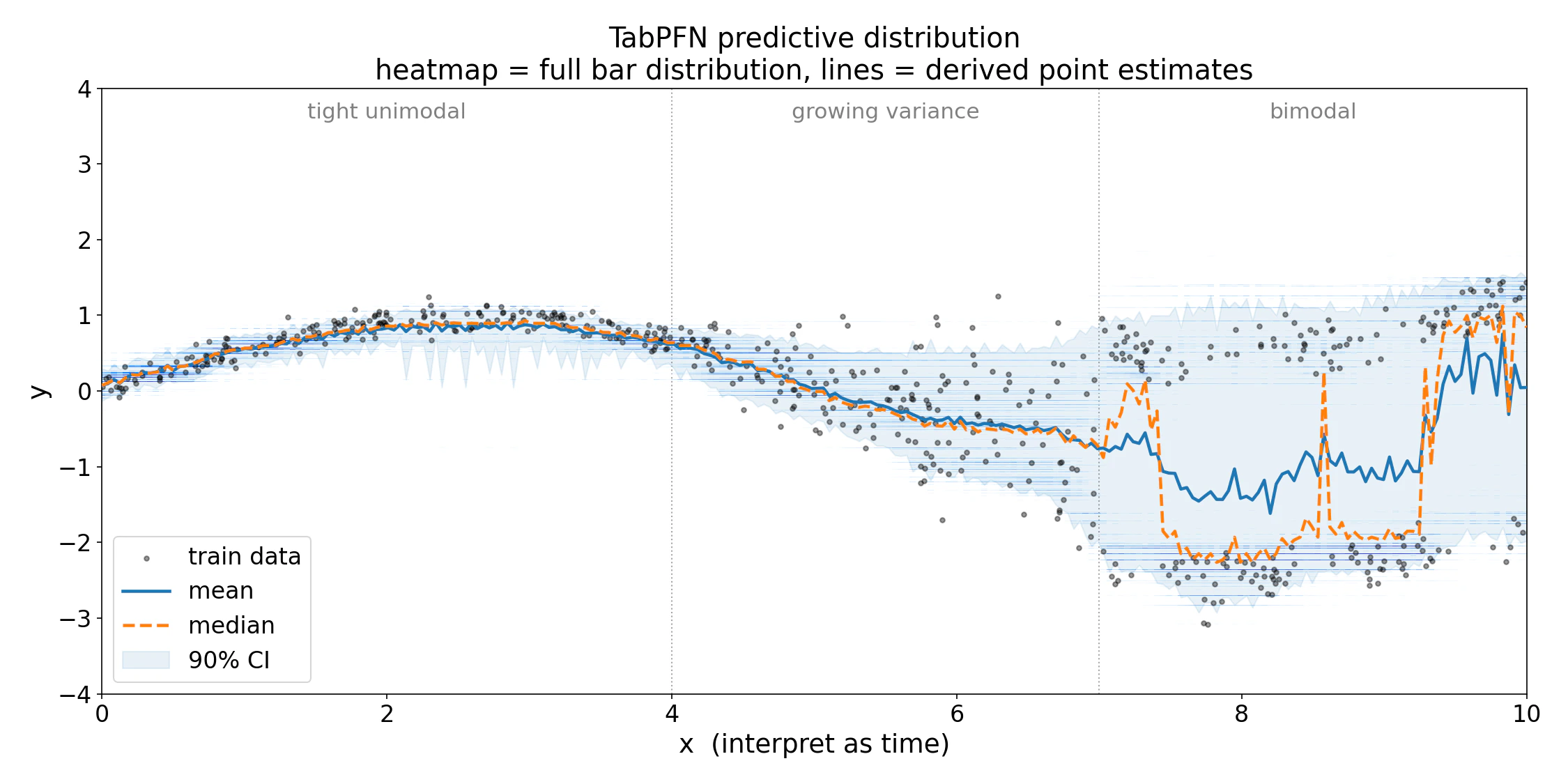 *Per-sample predictive density on a toy problem with three regimes: tight unimodal noise for $x < 4$, growing variance for $4 < x < 7$, and bimodal noise for $x > 7$. Each vertical column is the model's posterior $p(y \mid x)$. The bimodal region illustrates why a single point estimate can mislead: the mean (solid line) sits in the empty trough between modes while the median (dashed) snaps to the dominant mode.*
***
## Getting the full distribution
Set `output_type="full"` to get the raw distribution alongside all point estimates:
```python theme={null}
from tabpfn import TabPFNRegressor
reg = TabPFNRegressor()
reg.fit(X_train, y_train)
preds = reg.predict(X_test, output_type="full")
# Returns a dict with:
# "mean", "median", "mode" : point estimates (np.ndarray, shape (n,))
# "quantiles" : list of np.ndarray, one per requested quantile
# "criterion" : the BarDistribution object (.borders, .bucket_widths, ...)
# "logits" : torch.Tensor of shape (n, num_bars)
```
Other `output_type` values are convenience shortcuts that all derive from the same distribution:
| `output_type` | Returns | When to use |
| -------------------- | ---------------------------------------------------------------- | --------------------------------------------------------------------- |
| `"mean"` *(default)* | `np.ndarray`, shape `(n,)` | MSE-style metrics; optimal under squared loss for unimodal posteriors |
| `"median"` | `np.ndarray`, shape `(n,)` | Heavy-tailed or skewed targets; minimizes MAE |
| `"mode"` | `np.ndarray`, shape `(n,)` | "Most likely" answer for clean unimodal posteriors only |
| `"quantiles"` | `list[np.ndarray]`, one per entry in `quantiles=[...]` | Calibrated intervals and risk-aware decisions |
| `"main"` | dict with keys `"mean"`, `"median"`, `"mode"`, and `"quantiles"` | All point estimates in one call |
| `"full"` | `"main"` plus `"criterion"` and `"logits"` | Inspecting or plotting the distribution directly |
`output_type="full"` requires the local `tabpfn` package. The cloud client (`tabpfn-client`) does not return raw logits. Use `output_type="main"` or `output_type="quantiles"` there instead.
***
## Point estimates
All three point estimates are derived from the same `(logits, criterion)` pair:
The probability-weighted average over bucket midpoints. Under squared loss this is the optimal point estimate *given the model's learned distribution*, but if the distribution is bimodal, the mean falls between modes and may be a low-probability outcome. Use the full distribution or median when multimodality is likely.
```python theme={null}
mean_preds = reg.predict(X_test, output_type="mean") # default
```
You can also compute it manually from the full output:
```python theme={null}
preds = reg.predict(X_test, output_type="full")
mean_manual = preds["criterion"].mean(preds["logits"]).cpu().numpy()
```
The 0.5-quantile, found by inverting the exact piecewise-uniform CDF. Minimizes expected absolute error and is less sensitive than the mean to heavy-tailed uncertainty. Useful when you need a single number and suspect skewed posteriors.
```python theme={null}
median_preds = reg.predict(X_test, output_type="median")
```
The bucket with the highest **density** (probability mass divided by bucket width). For skewed or multimodal posteriors the mode may jump discontinuously with small input changes; prefer quantiles or the full distribution when the posterior is complex.
```python theme={null}
mode_preds = reg.predict(X_test, output_type="mode")
```
For multimodal posteriors, all three point estimates can mislead. The mean lands between modes, the median snaps to the dominant mode, and the mode may be unstable. In those cases, keep the full distribution.
*Per-sample predictive density on a toy problem with three regimes: tight unimodal noise for $x < 4$, growing variance for $4 < x < 7$, and bimodal noise for $x > 7$. Each vertical column is the model's posterior $p(y \mid x)$. The bimodal region illustrates why a single point estimate can mislead: the mean (solid line) sits in the empty trough between modes while the median (dashed) snaps to the dominant mode.*
***
## Getting the full distribution
Set `output_type="full"` to get the raw distribution alongside all point estimates:
```python theme={null}
from tabpfn import TabPFNRegressor
reg = TabPFNRegressor()
reg.fit(X_train, y_train)
preds = reg.predict(X_test, output_type="full")
# Returns a dict with:
# "mean", "median", "mode" : point estimates (np.ndarray, shape (n,))
# "quantiles" : list of np.ndarray, one per requested quantile
# "criterion" : the BarDistribution object (.borders, .bucket_widths, ...)
# "logits" : torch.Tensor of shape (n, num_bars)
```
Other `output_type` values are convenience shortcuts that all derive from the same distribution:
| `output_type` | Returns | When to use |
| -------------------- | ---------------------------------------------------------------- | --------------------------------------------------------------------- |
| `"mean"` *(default)* | `np.ndarray`, shape `(n,)` | MSE-style metrics; optimal under squared loss for unimodal posteriors |
| `"median"` | `np.ndarray`, shape `(n,)` | Heavy-tailed or skewed targets; minimizes MAE |
| `"mode"` | `np.ndarray`, shape `(n,)` | "Most likely" answer for clean unimodal posteriors only |
| `"quantiles"` | `list[np.ndarray]`, one per entry in `quantiles=[...]` | Calibrated intervals and risk-aware decisions |
| `"main"` | dict with keys `"mean"`, `"median"`, `"mode"`, and `"quantiles"` | All point estimates in one call |
| `"full"` | `"main"` plus `"criterion"` and `"logits"` | Inspecting or plotting the distribution directly |
`output_type="full"` requires the local `tabpfn` package. The cloud client (`tabpfn-client`) does not return raw logits. Use `output_type="main"` or `output_type="quantiles"` there instead.
***
## Point estimates
All three point estimates are derived from the same `(logits, criterion)` pair:
The probability-weighted average over bucket midpoints. Under squared loss this is the optimal point estimate *given the model's learned distribution*, but if the distribution is bimodal, the mean falls between modes and may be a low-probability outcome. Use the full distribution or median when multimodality is likely.
```python theme={null}
mean_preds = reg.predict(X_test, output_type="mean") # default
```
You can also compute it manually from the full output:
```python theme={null}
preds = reg.predict(X_test, output_type="full")
mean_manual = preds["criterion"].mean(preds["logits"]).cpu().numpy()
```
The 0.5-quantile, found by inverting the exact piecewise-uniform CDF. Minimizes expected absolute error and is less sensitive than the mean to heavy-tailed uncertainty. Useful when you need a single number and suspect skewed posteriors.
```python theme={null}
median_preds = reg.predict(X_test, output_type="median")
```
The bucket with the highest **density** (probability mass divided by bucket width). For skewed or multimodal posteriors the mode may jump discontinuously with small input changes; prefer quantiles or the full distribution when the posterior is complex.
```python theme={null}
mode_preds = reg.predict(X_test, output_type="mode")
```
For multimodal posteriors, all three point estimates can mislead. The mean lands between modes, the median snaps to the dominant mode, and the mode may be unstable. In those cases, keep the full distribution.
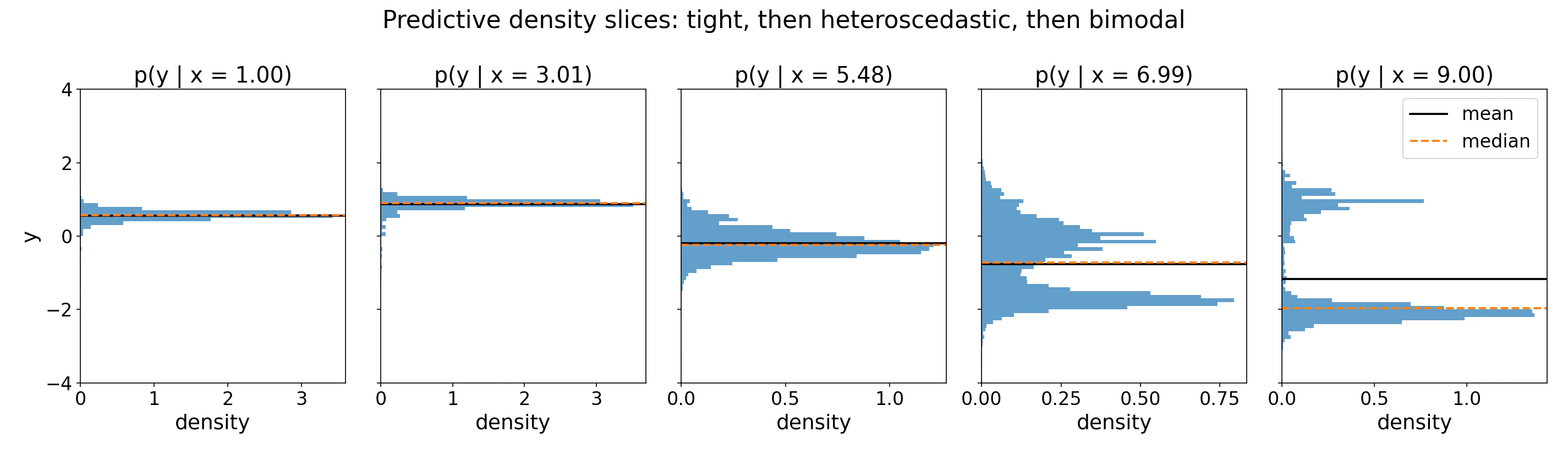 *1D slices of the heatmap at five test points. For $x \in \{1, 3\}$ the distribution is tight and unimodal, and mean and median agree. At $x = 5.5$ variance has grown but the shape remains unimodal. By $x = 7$ and $x = 9$ two modes emerge; the mean (dashed) sits in the empty trough between them while the median shifts to the dominant mode. Neither is "wrong" (they optimize different loss functions), but neither tells the full story.*
***
## Use Cases
### Quantiles and credible intervals
Pass `output_type="quantiles"` with a `quantiles` list, or compute them directly from the bar distribution's inverse CDF:
```python theme={null}
# Convenience: directly request quantiles
quantile_preds = reg.predict(
X_test,
output_type="quantiles",
quantiles=[0.05, 0.5, 0.95],
)
q05, q50, q95 = quantile_preds # each is np.ndarray of shape (n,), in the same order as quantiles=[...]
# Or compute from the full output using the inverse CDF
preds = reg.predict(X_test, output_type="full")
logits = preds["logits"]
criterion = preds["criterion"]
lower = criterion.icdf(logits, 0.05).cpu().numpy() # 5th percentile
upper = criterion.icdf(logits, 0.95).cpu().numpy() # 95th percentile
```
The `icdf` method inverts the piecewise-uniform CDF exactly within the model's bucket grid, so intervals are calibrated *under the model's distribution*. Empirical calibration on held-out data is still recommended before relying on these intervals in production.
### Single-sample plots
The core `tabpfn` package can draw the full predictive density for **single** test points. The helper renders the density as a curve, marks the mean, median, and mode, and shades a central credible interval.
```python theme={null}
from tabpfn.visualisation import plot_regression_distribution
out = reg.predict(X_test, output_type="full")
ax = plot_regression_distribution(out, sample_idx=0)
```
*1D slices of the heatmap at five test points. For $x \in \{1, 3\}$ the distribution is tight and unimodal, and mean and median agree. At $x = 5.5$ variance has grown but the shape remains unimodal. By $x = 7$ and $x = 9$ two modes emerge; the mean (dashed) sits in the empty trough between them while the median shifts to the dominant mode. Neither is "wrong" (they optimize different loss functions), but neither tells the full story.*
***
## Use Cases
### Quantiles and credible intervals
Pass `output_type="quantiles"` with a `quantiles` list, or compute them directly from the bar distribution's inverse CDF:
```python theme={null}
# Convenience: directly request quantiles
quantile_preds = reg.predict(
X_test,
output_type="quantiles",
quantiles=[0.05, 0.5, 0.95],
)
q05, q50, q95 = quantile_preds # each is np.ndarray of shape (n,), in the same order as quantiles=[...]
# Or compute from the full output using the inverse CDF
preds = reg.predict(X_test, output_type="full")
logits = preds["logits"]
criterion = preds["criterion"]
lower = criterion.icdf(logits, 0.05).cpu().numpy() # 5th percentile
upper = criterion.icdf(logits, 0.95).cpu().numpy() # 95th percentile
```
The `icdf` method inverts the piecewise-uniform CDF exactly within the model's bucket grid, so intervals are calibrated *under the model's distribution*. Empirical calibration on held-out data is still recommended before relying on these intervals in production.
### Single-sample plots
The core `tabpfn` package can draw the full predictive density for **single** test points. The helper renders the density as a curve, marks the mean, median, and mode, and shades a central credible interval.
```python theme={null}
from tabpfn.visualisation import plot_regression_distribution
out = reg.predict(X_test, output_type="full")
ax = plot_regression_distribution(out, sample_idx=0)
```
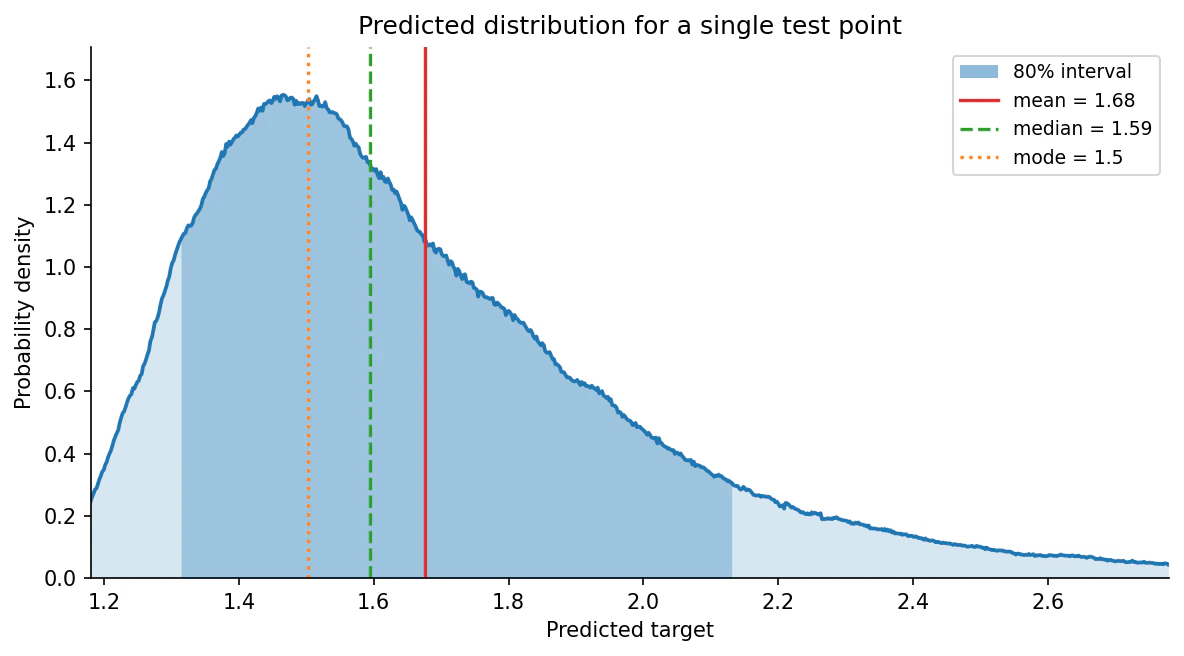 *Predicted density for a single test point. The posterior is unimodal but right-skewed, so the three point estimates separate in the textbook order: the mode (dotted) sits at the peak, the median (dashed) a little higher, and the mean (solid) is pulled furthest by the long right tail. The shaded band is the central 80% interval.*
The helper takes the `output_type="full"` dict directly and selects which row to plot with `sample_idx`; see [`plot_regression_distribution`](#library-reference) below for all arguments. Because it accepts an `ax`, you can lay several panels side by side to compare test points in one figure:
```python theme={null}
import matplotlib.pyplot as plt
out = reg.predict(X_test[selected], output_type="full")
fig, axes = plt.subplots(1, 3, figsize=(16, 4.5))
for i, ax in enumerate(axes):
plot_regression_distribution(out, sample_idx=i, ax=ax)
```
Plotting requires the optional matplotlib extra: `pip install "tabpfn[viz]"`.
The full runnable example, which fits a regressor on the diabetes dataset and plots its lowest, median, and highest predictions, is at [`examples/plot_regression_distribution.py`](https://github.com/PriorLabs/TabPFN/blob/main/examples/plot_regression_distribution.py).
### Visualizing many points at once
For comparing many test points at once, the `bar_distribution_plot.py` example helper in `tabpfn-extensions` renders the per-sample predictive density as a vertical heatmap. It is a standalone example file, so copy [`bar_distribution_plot.py`](https://github.com/PriorLabs/tabpfn-extensions/blob/main/examples/predictive_distribution/bar_distribution_plot.py) into your project and import it locally:
```python theme={null}
import matplotlib.pyplot as plt
import torch
from bar_distribution_plot import plot_bar_distribution
preds = reg.predict(X_test, output_type="full")
fig, ax = plt.subplots(figsize=(12, 6))
plot_bar_distribution(
ax,
x=torch.tensor(X_test[:, 0]),
bar_borders=preds["criterion"].borders.cpu(),
logits=preds["logits"].detach().cpu(), # (n, num_bars)
restrict_to_range=(-3.0, 3.0),
)
```
`X_test[:, 0]` is the first feature column, used here as the x-axis for plotting. Replace it with whichever 1D value makes sense as a horizontal axis for your data. See [`plot_bar_distribution`](#library-reference) below for the merging, cropping, and palette options.
*Predicted density for a single test point. The posterior is unimodal but right-skewed, so the three point estimates separate in the textbook order: the mode (dotted) sits at the peak, the median (dashed) a little higher, and the mean (solid) is pulled furthest by the long right tail. The shaded band is the central 80% interval.*
The helper takes the `output_type="full"` dict directly and selects which row to plot with `sample_idx`; see [`plot_regression_distribution`](#library-reference) below for all arguments. Because it accepts an `ax`, you can lay several panels side by side to compare test points in one figure:
```python theme={null}
import matplotlib.pyplot as plt
out = reg.predict(X_test[selected], output_type="full")
fig, axes = plt.subplots(1, 3, figsize=(16, 4.5))
for i, ax in enumerate(axes):
plot_regression_distribution(out, sample_idx=i, ax=ax)
```
Plotting requires the optional matplotlib extra: `pip install "tabpfn[viz]"`.
The full runnable example, which fits a regressor on the diabetes dataset and plots its lowest, median, and highest predictions, is at [`examples/plot_regression_distribution.py`](https://github.com/PriorLabs/TabPFN/blob/main/examples/plot_regression_distribution.py).
### Visualizing many points at once
For comparing many test points at once, the `bar_distribution_plot.py` example helper in `tabpfn-extensions` renders the per-sample predictive density as a vertical heatmap. It is a standalone example file, so copy [`bar_distribution_plot.py`](https://github.com/PriorLabs/tabpfn-extensions/blob/main/examples/predictive_distribution/bar_distribution_plot.py) into your project and import it locally:
```python theme={null}
import matplotlib.pyplot as plt
import torch
from bar_distribution_plot import plot_bar_distribution
preds = reg.predict(X_test, output_type="full")
fig, ax = plt.subplots(figsize=(12, 6))
plot_bar_distribution(
ax,
x=torch.tensor(X_test[:, 0]),
bar_borders=preds["criterion"].borders.cpu(),
logits=preds["logits"].detach().cpu(), # (n, num_bars)
restrict_to_range=(-3.0, 3.0),
)
```
`X_test[:, 0]` is the first feature column, used here as the x-axis for plotting. Replace it with whichever 1D value makes sense as a horizontal axis for your data. See [`plot_bar_distribution`](#library-reference) below for the merging, cropping, and palette options.
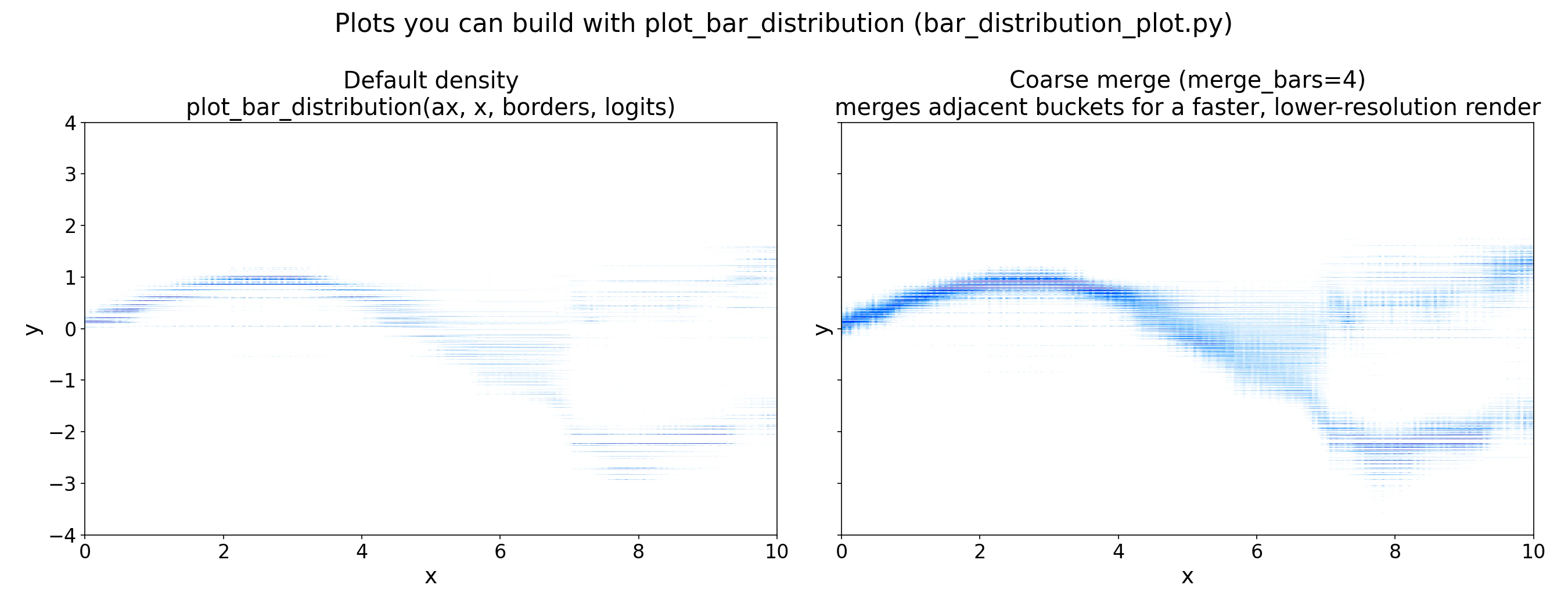 *Left: default linear-scale density. Right: `merge_bars=4`, merging adjacent buckets for a coarser but faster render. Use the coarser view during exploration and the full-resolution view for final figures.*
The full runnable example is at [`examples/predictive_distribution/predictive_distribution_example.py`](https://github.com/PriorLabs/tabpfn-extensions/blob/main/examples/predictive_distribution/predictive_distribution_example.py).
***
## What is the bar distribution?
TabPFN treats regression as classification over a grid of buckets on the target axis. The model outputs one logit per bucket; a softmax converts these to bucket probabilities, and within each bucket the density is uniform. The result is a **piecewise-uniform probability density** over `y`:
$p(y) = \frac{[\text{softmax}(\mathbf{z})]_k}{b_{k+1} - b_k} \quad \text{for } y \in [b_k,\, b_{k+1})$
With $\mathbf{z}$ the logits.
Buckets are non-uniform: they are packed densely near the bulk of the training targets and spread into long tails. The model can therefore represent skewed, multimodal, or heteroscedastic targets with no parametric assumptions.
You do not need to fully understand the formula above to use TabPFN's predicted regression distribution. All you need to remember is that TabPFN can output a distribution instead of a single point-estimate.
***
## Library Reference
### `tabpfn.visualisation.plot_regression_distribution`
Plot the predicted target distribution for a single sample as a density curve, marking point estimates and shading a central credible interval. Requires the matplotlib extra (`pip install "tabpfn[viz]"`). All arguments after `prediction` are keyword-only.
| Parameter | Type | Default | Description |
| ------------------- | ------------------------------ | ---------------------------- | ------------------------------------------------------------------------------------------------------------------------------------- |
| `prediction` | `dict` | *required* | Output of `reg.predict(X, output_type="full")`. May hold several samples; pick the one to plot with `sample_idx`. |
| `sample_idx` | `int` | `0` | Index of the sample to plot within `prediction`. |
| `statistics` | `Sequence[str]` | `("mean", "median", "mode")` | Point statistics to mark with a vertical line. Any of `"mean"`, `"median"`, `"mode"`. |
| `quantile_interval` | `tuple[float, float] \| None` | `(0.1, 0.9)` | Central interval to shade, e.g. `(0.1, 0.9)` for the 80% interval. Pass `None` to disable. |
| `zoom_quantile` | `float \| None` | `0.99` | Fraction of probability mass to keep in view, centred on the median. Pass `None` to show the full support. |
| `smooth` | `float` | `0.005` | Width of the display-only moving average over the density, as a fraction of the number of bars. Pass `0` to show the raw bar density. |
| `ax` | `matplotlib.axes.Axes \| None` | `None` | Existing axes to draw on. A new figure is created if omitted. |
| `color` | `str` | `"#1f77b4"` | Base colour of the density curve. |
**Returns:** `matplotlib.axes.Axes` — the axes containing the plot.
***
### `bar_distribution_plot.plot_bar_distribution`
Plot TabPFN's per-sample bar distribution as a vertical heatmap, one column per test point. This is an example helper from [`tabpfn-extensions`](https://github.com/PriorLabs/tabpfn-extensions/blob/main/examples/predictive_distribution/bar_distribution_plot.py) (copy it into your project); it depends on `seaborn` for its default palette.
| Parameter | Type | Default | Description |
| ------------------- | ----------------------------- | ---------- | ----------------------------------------------------------------------------------- |
| `ax` | `matplotlib.axes.Axes` | *required* | Axis to draw on (`fig, ax = plt.subplots()`). |
| `x` | `torch.Tensor` | *required* | 1D positions of shape `(num_examples,)` to place along the x-axis. |
| `bar_borders` | `torch.Tensor` | *required* | Borders of the bar distribution, from `preds["criterion"].borders`. |
| `logits` | `torch.Tensor` | *required* | Raw logits of shape `(num_examples, len(bar_borders) - 1)`, from `preds["logits"]`. |
| `merge_bars` | `int \| None` | `None` | If set, merge this many adjacent bars into one for a faster, coarser plot. |
| `restrict_to_range` | `tuple[float, float] \| None` | `None` | `(min_y, max_y)` to crop the y-axis to a range of target values. |
| `plot_log_probs` | `bool` | `False` | If `True`, plot log-densities (useful when a few bars dominate). |
| `**kwargs` | | | Forwarded to `heatmap_with_box_sizes` (e.g. `palette`, `threshold_i`). |
**Returns:** `None` — draws the heatmap onto the supplied `ax`.
***
## Summary
The bar distribution gives you everything a point estimate discards: shape, skew, multimodality, and calibrated uncertainty. Use `output_type="mean"` when you need scikit-learn compatibility, `output_type="quantiles"` when you need intervals, and `output_type="full"` when you want to inspect or plot the distribution directly. For inputs well outside the training range, treat the distribution with caution: bucket boundaries are fixed at training time and the model does not flag OOD inputs automatically.
***
Point estimates, quantiles, and full distribution overview.
Explain predictions with Shapley values.
Optimize predictions for custom loss functions.
Common questions and troubleshooting.
*Left: default linear-scale density. Right: `merge_bars=4`, merging adjacent buckets for a coarser but faster render. Use the coarser view during exploration and the full-resolution view for final figures.*
The full runnable example is at [`examples/predictive_distribution/predictive_distribution_example.py`](https://github.com/PriorLabs/tabpfn-extensions/blob/main/examples/predictive_distribution/predictive_distribution_example.py).
***
## What is the bar distribution?
TabPFN treats regression as classification over a grid of buckets on the target axis. The model outputs one logit per bucket; a softmax converts these to bucket probabilities, and within each bucket the density is uniform. The result is a **piecewise-uniform probability density** over `y`:
$p(y) = \frac{[\text{softmax}(\mathbf{z})]_k}{b_{k+1} - b_k} \quad \text{for } y \in [b_k,\, b_{k+1})$
With $\mathbf{z}$ the logits.
Buckets are non-uniform: they are packed densely near the bulk of the training targets and spread into long tails. The model can therefore represent skewed, multimodal, or heteroscedastic targets with no parametric assumptions.
You do not need to fully understand the formula above to use TabPFN's predicted regression distribution. All you need to remember is that TabPFN can output a distribution instead of a single point-estimate.
***
## Library Reference
### `tabpfn.visualisation.plot_regression_distribution`
Plot the predicted target distribution for a single sample as a density curve, marking point estimates and shading a central credible interval. Requires the matplotlib extra (`pip install "tabpfn[viz]"`). All arguments after `prediction` are keyword-only.
| Parameter | Type | Default | Description |
| ------------------- | ------------------------------ | ---------------------------- | ------------------------------------------------------------------------------------------------------------------------------------- |
| `prediction` | `dict` | *required* | Output of `reg.predict(X, output_type="full")`. May hold several samples; pick the one to plot with `sample_idx`. |
| `sample_idx` | `int` | `0` | Index of the sample to plot within `prediction`. |
| `statistics` | `Sequence[str]` | `("mean", "median", "mode")` | Point statistics to mark with a vertical line. Any of `"mean"`, `"median"`, `"mode"`. |
| `quantile_interval` | `tuple[float, float] \| None` | `(0.1, 0.9)` | Central interval to shade, e.g. `(0.1, 0.9)` for the 80% interval. Pass `None` to disable. |
| `zoom_quantile` | `float \| None` | `0.99` | Fraction of probability mass to keep in view, centred on the median. Pass `None` to show the full support. |
| `smooth` | `float` | `0.005` | Width of the display-only moving average over the density, as a fraction of the number of bars. Pass `0` to show the raw bar density. |
| `ax` | `matplotlib.axes.Axes \| None` | `None` | Existing axes to draw on. A new figure is created if omitted. |
| `color` | `str` | `"#1f77b4"` | Base colour of the density curve. |
**Returns:** `matplotlib.axes.Axes` — the axes containing the plot.
***
### `bar_distribution_plot.plot_bar_distribution`
Plot TabPFN's per-sample bar distribution as a vertical heatmap, one column per test point. This is an example helper from [`tabpfn-extensions`](https://github.com/PriorLabs/tabpfn-extensions/blob/main/examples/predictive_distribution/bar_distribution_plot.py) (copy it into your project); it depends on `seaborn` for its default palette.
| Parameter | Type | Default | Description |
| ------------------- | ----------------------------- | ---------- | ----------------------------------------------------------------------------------- |
| `ax` | `matplotlib.axes.Axes` | *required* | Axis to draw on (`fig, ax = plt.subplots()`). |
| `x` | `torch.Tensor` | *required* | 1D positions of shape `(num_examples,)` to place along the x-axis. |
| `bar_borders` | `torch.Tensor` | *required* | Borders of the bar distribution, from `preds["criterion"].borders`. |
| `logits` | `torch.Tensor` | *required* | Raw logits of shape `(num_examples, len(bar_borders) - 1)`, from `preds["logits"]`. |
| `merge_bars` | `int \| None` | `None` | If set, merge this many adjacent bars into one for a faster, coarser plot. |
| `restrict_to_range` | `tuple[float, float] \| None` | `None` | `(min_y, max_y)` to crop the y-axis to a range of target values. |
| `plot_log_probs` | `bool` | `False` | If `True`, plot log-densities (useful when a few bars dominate). |
| `**kwargs` | | | Forwarded to `heatmap_with_box_sizes` (e.g. `palette`, `threshold_i`). |
**Returns:** `None` — draws the heatmap onto the supplied `ax`.
***
## Summary
The bar distribution gives you everything a point estimate discards: shape, skew, multimodality, and calibrated uncertainty. Use `output_type="mean"` when you need scikit-learn compatibility, `output_type="quantiles"` when you need intervals, and `output_type="full"` when you want to inspect or plot the distribution directly. For inputs well outside the training range, treat the distribution with caution: bucket boundaries are fixed at training time and the model does not flag OOD inputs automatically.
***
Point estimates, quantiles, and full distribution overview.
Explain predictions with Shapley values.
Optimize predictions for custom loss functions.
Common questions and troubleshooting.