
tabpfn and via the client tabpfn-client.
The model family ships with:
- TabPFN-3.5 (base): which is what we’re using in this notebook. Available both via the open-source package and the client.
- TabPFN-3.5-Fast: currently in alpha, this is the one to use when latency is important, and is available both with the open-source and client.
- TabPFN-3.5-Plus: available only via the client, this one adds enhanced processing to extract signal from text-rich datasets
- TabPFN-3.5-Thinking: also available only via the client, this one improves performance by spending more compute
Warning — memory and runtime: This comparison can use substantial system RAM and GPU memory and may take a while to finish. XGBoost tuning alone takes 10 minutes. The local TabFM run may run out of memory on a T4 GPU; use a more powerful GPU with sufficient VRAM, such as a high-memory NVIDIA RTX GPU. TabPFN runs through the API and does not use your local GPU.We use the ROC AUC as classification metric and tune XGBoost with five-fold cross-validation, followed by a full training-set refit. We define latency as the median time for
fit plus predict_proba over three repetitions after an untimed warm-up fit and prediction.
TabPFN 3.5 and TabPFN v3 run through the TabPFN API via tabpfn-client, so their latency includes the network round trip. TabFM runs on your local GPU, and XGBoost uses CPU on the same machine. Their timings depend on that hardware and are not directly comparable to API server compute times.
Client setup
We use TabPFN 3.5 throughtabpfn-client. Create an API key on the TabPFN platform and set the TABPFN_TOKEN environment variable before starting Jupyter. On Colab, you can store it as a secret named TABPFN_TOKEN using the key icon in the sidebar. An existing cached login also works.
The comparison needs a GPU for TabFM and takes at least 10 minutes because of the XGBoost tuning budget.
Imports and configuration
We fix a single random seed for every model.TabPFNClassifier comes from tabpfn_client, so TabPFN runs on the API and nothing has to be downloaded. torch is only needed for TabFM, which we run locally.
Load the dataset
First, let’s load the Taiwanese Bankruptcy dataset from OpenML (task 363706). We use the task’s official train/test split so the numbers are reproducible, and label-encode the target so every model sees integer classes.Measuring quality and speed
Every model is scored the same way.metrics computes ROC AUC (our primary metric), log loss and accuracy from predicted probabilities. timed_fit_predict measures the median time for fit plus predict_proba over three repetitions. An untimed fit and prediction first warm up each model, including loading TabFM and TabPFN. Each measured repetition then refits on the full training set and predicts the full test set. For the locally run TabFM we synchronize CUDA around each repetition so the timer includes completed GPU work. XGBoost preprocessing and hyperparameter search are outside this timer; its final fit is included.
Run the models
TabPFN and TabFM need no dataset-specific hyperparameter search.TabPFN 3.5 and TabPFN v3
Both TabPFN versions go through the sameTabPFNClassifier API. model_path picks the model: "v3.5_default" for the new model and "v3_default" for the previous one. We tell the model which columns are categorical; everything else stays at the defaults. The timed fit-and-predict calls include API request and network time after an untimed warm-up. The service may cache repeated uploads; these are warm API wall times, not server-only compute times.
TabFM
TabFM is Google’s tabular foundation model. Its PyTorch loader downloads the pretrained weights, andTabFMClassifier provides the same fit-and-predict interface. We use its default settings, with no dataset-specific tuning.
XGBoost, out of the box
XGBoost is shown both out of the box and after 10 minutes of tuning. Unlike the foundation models, XGBoost needs explicit preprocessing: we median-impute numerical columns and mode-impute plus ordinal-encode categorical ones. The default run keeps the predictive hyperparameters at their defaults; we fix the random seed and use histogram trees with the available CPU threads.XGBoost, tuned for 10 minutes
To give XGBoost a fair shot we run a random search over its main hyperparameters (log-uniform ranges for learning rate and regularization) with five-fold stratified cross-validation and early stopping on each fold. The first candidate is a sensible hand-picked configuration; the rest are sampled at random until the time budget runs out. The best configuration by mean CV ROC AUC is refit on the full training set with the median number of boosting rounds found during CV. This cell takes about 10 minutes to run.Quality and speed
With all five models scored, we put the results side by side.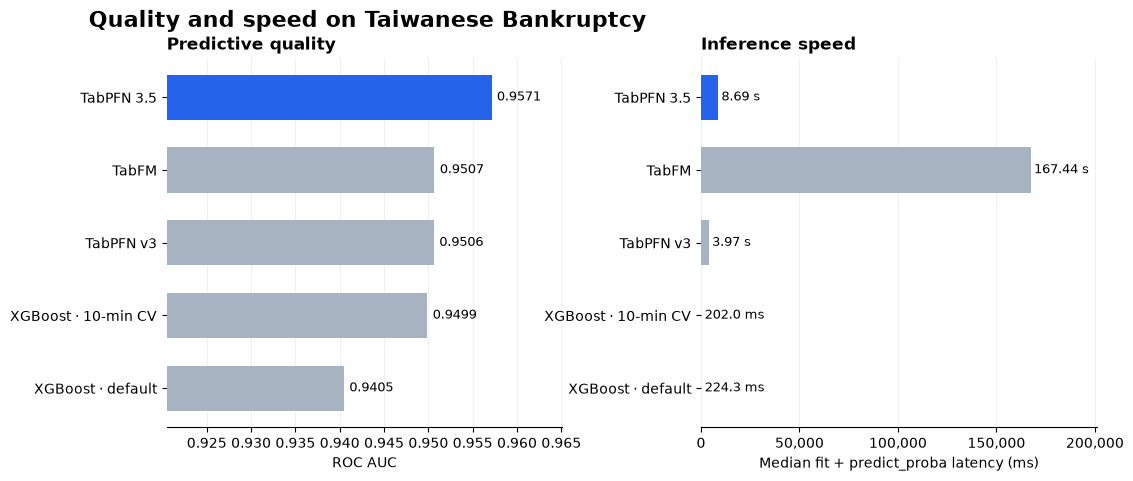 On this split, TabPFN 3.5 has the highest ROC AUC and lowest log loss. XGBoost has much lower fit-plus-predict latency.
ROC AUC measures how well each model ranks bankrupt companies above non-bankrupt ones; higher is better. Compare it with log loss to assess the quality of the predicted probabilities, and with latency to judge the cost of making predictions.
These results describe one dataset and one held-out split. API timings include network overhead, while TabFM timings depend on your GPU. The 10-minute XGBoost search can also complete a different number of trials on different machines. XGBoost timings include the final fit and prediction, but exclude preprocessing and the 10-minute hyperparameter search.
On this split, TabPFN 3.5 has the highest ROC AUC and lowest log loss. XGBoost has much lower fit-plus-predict latency.
ROC AUC measures how well each model ranks bankrupt companies above non-bankrupt ones; higher is better. Compare it with log loss to assess the quality of the predicted probabilities, and with latency to judge the cost of making predictions.
These results describe one dataset and one held-out split. API timings include network overhead, while TabFM timings depend on your GPU. The 10-minute XGBoost search can also complete a different number of trials on different machines. XGBoost timings include the final fit and prediction, but exclude preprocessing and the 10-minute hyperparameter search.