
inference_config. Compare any change with the checkpoint defaults on a validation set that represents your real use case.
How estimators use preprocessing
An estimator is one TabPFN forward pass with its own preprocessing choices.n_estimators controls how many of these passes TabPFN runs for a prediction.
Depending on the resolved configuration, each estimator can:
- Use a row subset chosen through
SUBSAMPLE_SAMPLES, drawn withSAMPLE_SUBSAMPLING_METHOD. - Add polynomial features, then remove constant features.
- Use one recipe from
PREPROCESS_TRANSFORMSto reshape numerical distributions and encode categorical features. - Add optional SVD and fingerprint features.
- Select a feature subset if the processed data has more columns than
max_features_per_estimator.FEATURE_SUBSAMPLING_METHODdecides which columns that estimator receives. - Randomize feature order. A classifier can also randomize class order.
- For regression, use one target transform and convert predictions back to the original target scale.
- Run the model forward pass.
PREPROCESS_TRANSFORMS is a list of estimator recipes, not a sequence of transforms applied to the same data. TabPFN repeats the list as evenly as possible across estimators. With two recipes and eight estimators, each recipe is normally used by four estimators. Regression distributes combinations of feature recipes and target transforms across estimators.
What happens by default
The exact defaults are stored in the model checkpoint. They can differ between TabPFN versions, tasks, and specialized checkpoints. TabPFN-3.5 uses one feature recipe that keeps numerical values unchanged and ordinal-encodes categoricals in a shuffled order, with up to 768 features per estimator. Older checkpoints combine two recipes with a squashing or quantile transform and, for some checkpoints, extra SVD features. All versions use feature shuffling and a fingerprint feature, and no polynomial features or row subsampling by default.
N_ESTIMATORS (4), and TabPFN-3 and older checkpoints differ in most of these values. Always inspect the model that you plan to use.
Only keys that you pass are changed. All other values still come from the checkpoint:
Feature distribution transforms
A preprocessing transform is the complete data preparation recipe for one estimator. It defines:- how that estimator reshapes numerical feature distributions
- how it handles categorical features
- whether it keeps the original features
- whether it adds SVD features
- how many features it can receive
PREPROCESS_TRANSFORMS contains these recipes. TabPFN distributes them across estimators as described in How estimators use preprocessing.
For example, the TabPFN-3.5 output above contains one recipe, so all eight estimators use none with shuffled ordinal categoricals and differ only in their randomized feature order and other estimator-specific settings. TabPFN-3 checkpoints contain two recipes, squashing_scaler_default and quantile_uni, so four estimators normally use each.
You can control preprocessing per estimator. If n_estimators=4 and you provide four recipes, each recipe is assigned to one estimator. If you provide fewer recipes, TabPFN repeats them as evenly as possible. You can repeat the same recipe yourself when several estimators should use it.
Top-level settings such as
POLYNOMIAL_FEATURES and FINGERPRINT_FEATURE apply to every estimator. Only the fields inside each PREPROCESS_TRANSFORMS item vary through this list. For regression, TabPFN creates combinations of feature recipes and REGRESSION_Y_PREPROCESS_TRANSFORMS. Use one target transform if you want a direct one-to-one assignment of feature recipes.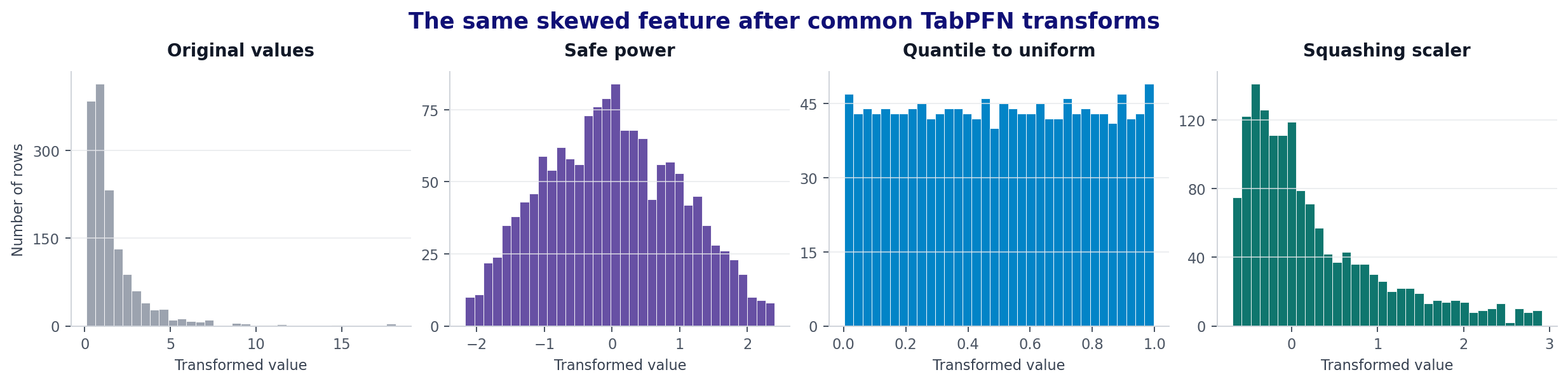
safepower makes it more symmetric, quantile_uni spreads ranks evenly from 0 to 1, and the squashing scaler reduces the effect of extreme values while keeping more of the original spacing.
Common choices
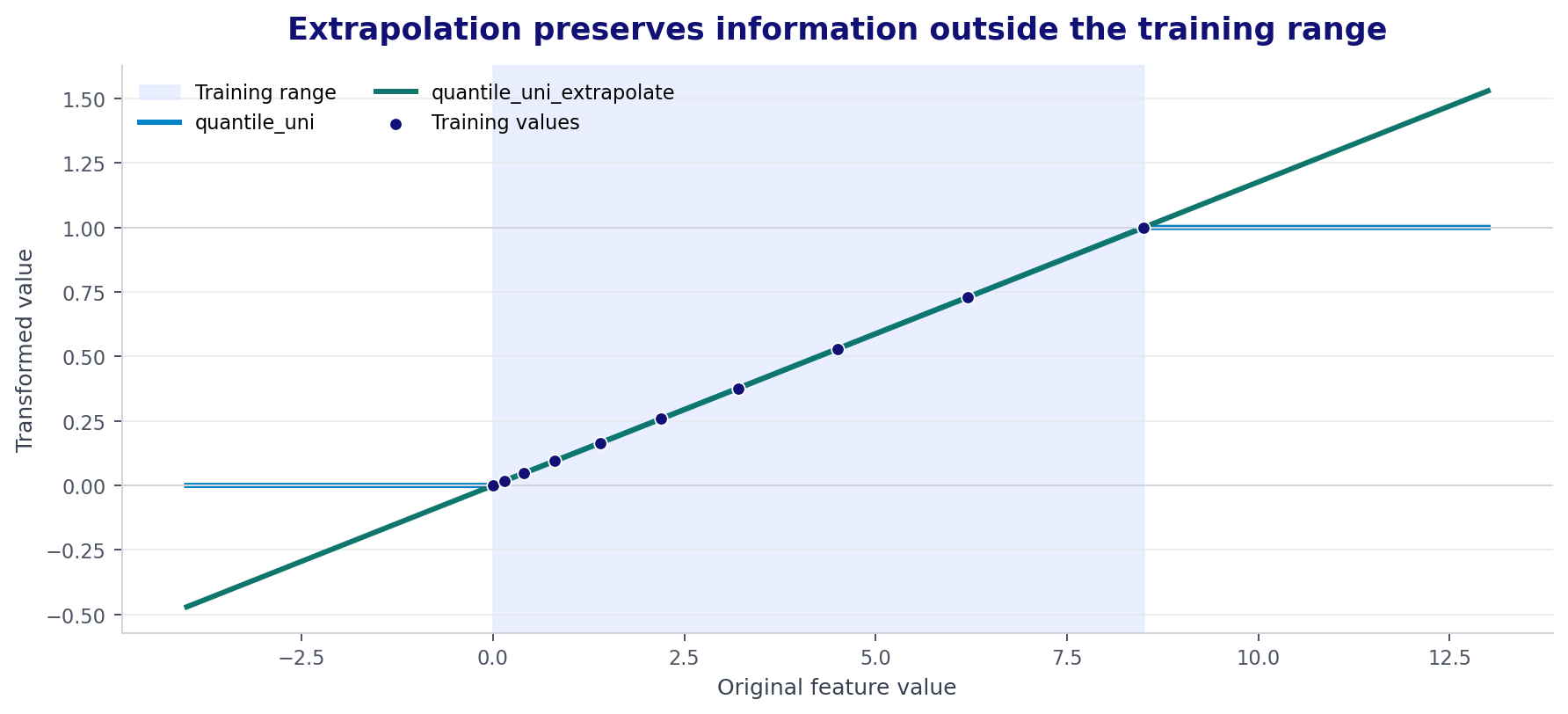
Quantile transforms usually clip values outside the training range to the output boundary. The extrapolating version keeps some information about how far a new value is outside that range.
All feature transform names
The following names are accepted byPreprocessorConfig.name:
The coarse quantile variants use about half as many quantiles as the regular variants. The fine variants use up to one quantile per training row. More quantiles preserve finer ranks but take more time and memory.
KDI transforms use a smooth estimate of the feature distribution. Names ending in
_uni produce a uniform output. Other KDI names produce a normal output. They need the kditransform implementation for their intended behavior. norm_and_kdi creates two output columns for each transformed input column.
Text features
The localtabpfn package expands text columns into numeric features alongside numerical and categorical data. Start with the original text in your DataFrame; manual vectorization is not required. The API replaces this with proprietary text processing for stronger results on text-rich datasets.
A column is treated as text when all three hold:
- It has pandas
stringdtype, in any storage, or a pyarrow string dtype. Anobjectcolumn is never expanded, so load text withdtype="string"ordtype_backend="pyarrow". - It has more than
MIN_CARDINALITY_FOR_TEXTdistinct values, 30 by default. - It is not declared categorical through
categorical_features_indicesor pandascategorydtype.
An unseen string at prediction time is encoded by the character n-grams it shares with the training column. A missing value, or a string that shares none, becomes an all-zero row. Text expansion is not run by the fine-tuning estimators.
If a string column is an identifier rather than free text, such as a merchant name or SKU, declare it as categorical instead. If you try manual text encoding or dimensionality reduction, compare it against the raw-text baseline on held-out data. See Text features for examples and Feature engineering for optional transformations.
Datetime features
A column with a genuine datetime dtype is expanded into calendar features withskrub.DatetimeEncoder: year, day of year, seconds since the epoch, and cyclical month, day, and weekday pairs, plus time of day when the column carries one. A timedelta column becomes its length in seconds.
Only a real datetime dtype counts. A string column that looks like a date, such as
"2020-01-01", is read as a category or text. Convert it with pd.to_datetime before fitting. The same columns must hold datetimes at prediction time, and a datetime column cannot also be declared categorical. Date expansion is not run by the fine-tuning estimators.
For TabPFN-3 and older checkpoints, where TRANSFORM_DATES is off, pass inference_config={"TRANSFORM_DATES": True} or extract features yourself. See Datetime features for signals worth adding by hand.
Categorical features
TabPFN first detects which columns are categorical. Thecategorical_name field then tells an estimator how to represent those columns:
Declared categoricals are taken at face value. A column listed in
categorical_features_indices, or with pandas category dtype, is categorical at any cardinality and is never treated as text. TabPFN uses categorical columns at any cardinality, so merchant IDs, SKUs, zip codes, and other identifiers with thousands of levels belong in this group.
Automatic detection for undeclared columns is controlled by four top-level settings:
Automatic detection is deliberately narrow: an undeclared integer column with four or more distinct values is numeric. Store numbers, product codes, and zip codes stored as integers must be declared. Categorical typing is one of the highest-value changes you can make.
Configure a feature transform
Each item inPREPROCESS_TRANSFORMS accepts these fields:
append_original=Falsereplaces the numerical columns with their transformed values.Truekeeps the original columns and appends transformed copies.- With
append_original="auto", TabPFN appends copies only when the original data has fewer than 500 features and its feature count is no more than half ofmax_features_per_estimator. Otherwise, it replaces the numerical columns. global_transformer_nameadds features that combine information across columns."svd"appends up to half as many SVD components as input features."svd_quarter_components"appends up to one quarter as many. Both are also limited by the number of rows.Noneadds no global features.
For example, this configuration combines an extrapolating rank transform with an unchanged representation:
Feature creation and ordering
These settings change the columns that each estimator receives:
The fingerprint is not a semantic identifier. It helps attention distinguish duplicate rows. Do not replace a real entity or time identifier with it.
Polynomial features are a useful general tuning option, even when you do not know the exact interaction in advance. An integer gives TabPFN a random selection of polynomial features while controlling feature growth:
"all" is also a reasonable experiment.
Wide tables and feature selection
max_features_per_estimator sets the feature budget inside each PREPROCESS_TRANSFORMS item. When the processed table is wider, FEATURE_SUBSAMPLING_METHOD controls which columns each estimator receives.
Related settings are:
FEATURE_SUBSAMPLING_CONSTANT_FEATURE_COUNT, base value50, controls N for"constant_and_balanced".FEATURE_SUBSAMPLING_IMPORTANCE_TOP_K_COUNTaccepts an integer, a fraction in(0, 1], or"auto". With"auto", TabPFN keeps the top 150 columns when there are more than 200 features. Below that, it does not filter by importance.
Regression target transforms
REGRESSION_Y_PREPROCESS_TRANSFORMS is a tuple or list. TabPFN cycles through these target transforms together with the feature preprocessing configurations. It converts predictions back to the original target scale before combining them.
The base value is (None, "safepower"), so some estimators see the original target and others see a safely power-transformed target.
The full set of practical target names also includes the coarse and fine quantile variants,
"squashing_scaler_default", "squashing_scaler_max10", "exp", and the single-output KDI variants. "exp" applies the exponential function before prediction and is rarely a useful default. The experimental "adaptive" and multi-output "norm_and_kdi" registry entries are not suitable target choices.
Start with None and "safepower". Add one option at a time because every extra target transform changes the estimator mix.
Row subsampling
Each estimator can run on a subset of the training rows. Subsampling happens before other preprocessing and the forward pass, so it changes the training context TabPFN sees. Use it to fit tables above the 1,000,000 row limit, to lower runtime and memory, or to control the class or target mix each estimator sees.SAMPLE_SUBSAMPLING_METHOD accepts:
Subsampling a 3,000,000 row table so that each of 16 estimators sees a different 1,000,000 rows:
"majority_downsample":
SUBSAMPLE_SAMPLESmust exceed the number of non-majority rows, so at least one majority row remains. Otherwise the fit raises.- It needs one unique most frequent target value. If there is a tie, TabPFN warns and falls back to
"stratified"for classification or"balanced"for regression. - Downsampling the majority shifts the prior the model sees. Predicted probabilities and regression means inherit that shift, while rankings do not. It tends to improve AUC and worsen log loss, so pick the metric you are judged by, and rescale regression predictions to the training mean if the level matters. For classification, TabPFN warns when subsampling makes the original majority class smaller than another class.
SUBSAMPLE_SAMPLES with a higher n_estimators when the full table matters and runtime allows.
Outliers and infinite values
Preprocessing on the GPU
ENABLE_GPU_PREPROCESSING moves supported quantile and squashing transforms, SVD feature generation, fingerprint creation, and feature shuffling to the model device. This can reduce preprocessing time on large datasets. Unsupported transforms still run on the CPU.
The base dataclass value is False, but a checkpoint can set a different value. Inspect the resolved configuration for your model. Try GPU preprocessing when you have more than about 10,000 rows and preprocessing is a visible part of runtime. It is less useful for small data.
Settings to leave unchanged
The inference configuration also contains limits and compatibility controls used by the model and its checkpoint. They are not normal preprocessing tuning options:MAX_NUMBER_OF_CLASSES,MAX_NUMBER_OF_FEATURES, andMAX_NUMBER_OF_SAMPLESdescribe model limits.MAX_CPU_SAMPLESguards against very slow CPU inference.FIX_NAN_BORDERS_AFTER_TARGET_TRANSFORMrepairs invalid regression distribution borders and should stay enabled.USE_SKLEARN_16_DECIMAL_PRECISIONis a compatibility option, not a performance setting.- Private keys beginning with
_define task-specific internal defaults.
ignore_pretraining_limits through the estimator interface when appropriate. Do not increase the limit values inside inference_config to hide a warning.
A practical tuning order
- Fit and measure the unchanged model.
- Check column types: declare categoricals, keep datetimes as datetime dtype, load free text as
stringdtype, and include group identifiers as categoricals. - For heavy imbalance or zero-inflated targets, try
"majority_downsample"row subsampling and check the metric you care about. - For wide data beyond about 6,000 columns, raise
n_estimatorsor tune the feature subsampling method. - For skewed regression targets, test one extra target transform.
- For distribution shift, try
"quantile_uni_extrapolate"alongside the default representation. - Try a limited number of polynomial features, then try
"all"if the table is narrow. - Keep a change only when it improves validation results across several seeds or splits.