
TabPFNWithImages from tabpfn-extensions. You keep your dataset as it is, tell the wrapper which column holds images, and it turns each picture into a handful of numeric features before TabPFN sees it.
The motivation comes from the MulTaBench paper, which curates 40 datasets where combining tabular fields with an image or a text provably beats either modality alone. We use one of its image tasks, CheXpert: decide whether a chest X-ray shows cardiomegaly, an enlarged heart, from the scan together with the patient’s sex and age and the view of the scan. The full MulTaBench task has 46,437 X-rays and 17 tabular columns, most of them other radiology labels. To keep the notebook quick we use a toy version published on Kaggle: a random 5,000-row subsample that keeps only the four patient fields and the target. The scores below are for this toy task and are not comparable with the benchmark’s numbers.
Setup
The image extension for TabPFN ships intabpfn-extensions[image].
Two things need a one-time acceptance. The image encoder’s weights, DINOv3, are gated on the Hugging Face Hub: accept the license on the model page, then run hf auth login in a terminal or set the HF_TOKEN environment variable. The local tabpfn package also asks you to accept its license the first time it downloads model weights; in a notebook, set TABPFN_TOKEN to an API key from the TabPFN platform.
A GPU is recommended for the full toy subsample: embedding 5,000 X-rays and fitting TabPFN on 3,750 rows is a few minutes on a T4 and much longer on a CPU. Without one, the notebook runs on a 300-row sample so every cell finishes quickly. Set N_ROWS = None to use everything.
Load and inspect the data
We fetch the toy CheXpert subsample from Kaggle. Each row is one chest X-ray study: the patient’s sex and age, whether the view is frontal or lateral and, for frontal views, whether it was taken AP or PA,X-Ray Image, which is the path of the scan relative to the archive, and the target Cardiomegaly, coded 1 for positive, 0 for negative and -1 when the radiology report was uncertain. AP/PA is blank for lateral views; TabPFN handles missing values natively, so we leave it as it is.
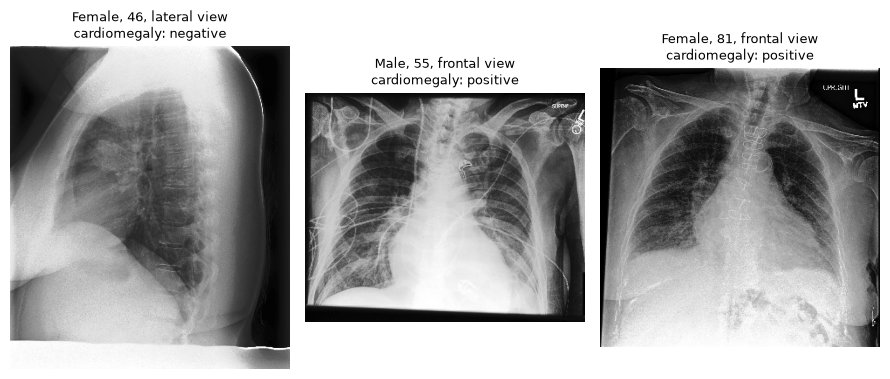 The image column just needs the absolute path of each file. We rename it
 image, pop Cardiomegaly as the target so it stays unknown for prediction, and split the dataset 75/25, stratified so the three classes keep their proportions in both halves.
How it works
Each image is turned into one vector by a frozen, pretrained image encoder. The encoder isDINOv3 ViT-S/16, a small Vision Transformer, which is a neural network that reads an image as a grid of patches and was trained without labels to produce a useful summary of any picture. The summary is its “CLS embedding”: one vector of 384 numbers per image.
Those 384 numbers are standardised and reduced to 30 with principal component analysis (PCA). TabPFN then sees 30 ordinary numeric columns next to the original ones. Nothing is trained along the way: the encoder is frozen, and TabPFN does in-context learning in a single forward pass over the training rows. The whole thing stays fast and hard to overfit.
Baseline: tabular fields only
Plain TabPFN on sex, age and view. We start without the X-ray, so we know what the tabular fields alone are worth. The target has three classes, so we score with macro-averaged one-vs-rest ROC AUC, where 0.5 is random guessing and 1.0 is perfect.Picture only
TabPFNWithImages takes the estimator to wrap and image_features_indices, the positions of the image columns in the dataset you pass to fit, just like TabPFN’s own categorical_features_indices. Here the frame has one column, so the index is 0. The first call downloads the encoder weights.
You’ll need to agree to the model license for DINOv3 on Hugging Face to use it.
Tabular + picture
Now the frame has the four tabular columns followed byimage, so the image column sits at position len(tabular). Everything else is unchanged.
kagglehub like the one used here.