
Fitting Large Datasets in Limited Memory
Three levers for keeping a large dataset within a GPU’s memory budget. A large training or test set can push TabPFN past the available GPU memory and triggerCUDA out of memory. Memory use is driven by two things, the size of the training context and the size of the test batch, and each one has a lever. We work through three techniques from the OOM troubleshooting guide:
- Subsample a large training set
- Chunk a large test set
- Offload entirely to the API client
Setup
Install, import, and authenticate.Building a Large Dataset
200,000 rows and 100 features.Measuring Peak VRAM
Reset the counter before each run, read the peak afterwards. We reset PyTorch’s memory counter before each run, then read back the peak allocation afterwards.Baseline: the Naive Fit
The whole train and test set at once First the obvious thing: hand TabPFN the whole training set and the whole test set at once.Subsampling a Large Training Set
SUBSAMPLE_SAMPLES caps how many rows each estimator attends over.
Rather than attend over all 140,000 training rows, each estimator sees a balanced random subset. Set SUBSAMPLE_SAMPLES, then raise n_estimators so the ensemble still covers the data.
Predicting a Large Test Set in Chunks
Process the test rows in batches, not all at once. Feeding all 60,000 test rows at once spikes memory; instead we predict in chunks of 3,000 and stack the results. Same predictions, a fraction of the peak. This lever tackles the test side, independently of the training set.The Story in One Chart
Peak VRAM for each lever, against the T4 ceiling. Peak GPU VRAM for each approach. The naive run completed at 3.56 GB; subsampling and chunking reduced peak memory further, with all measured runs below the T4’s 16 GB ceiling.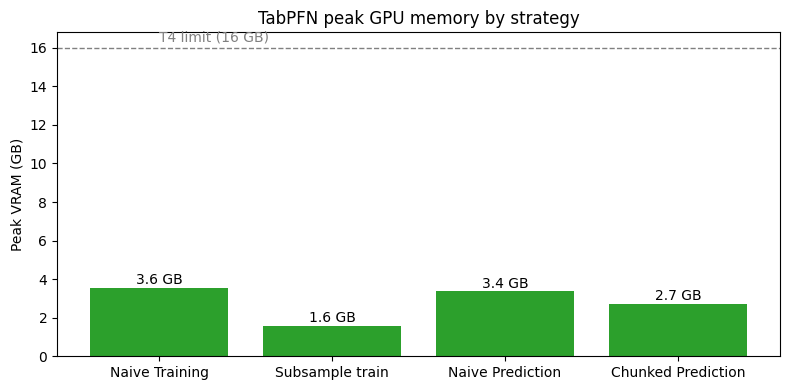
No GPU? Use the API Client
Run the exact same model remotely, with zero local VRAM. If you do not have (or do not want to manage) a GPU,tabpfn_client runs the exact same model on Prior Labs’ infrastructure. Local GPU VRAM use: zero.