
Improving TabPFN Performance with Thinking Mode
The simplest, strongest way to push TabPFN further. TabPFN is strong out of the box. The newest and most powerful way to improve it is thinking mode: TabPFN-3-Thinking spends extra compute at fit time to deliver better predictions, enabled with a single flag. You pay the optimisation cost once at fit time, and every prediction afterwards benefits. Thinking mode runs on the hosted API client (tabpfn-client), so this whole notebook uses the client. We try it on two price-prediction datasets, one where TabPFN is already very strong and one that is harder, to see what the extra compute buys.
Setup
Install, authenticate, and import.Data Loaders
Two price-prediction datasets.diamonds is already easy for TabPFN (R² above 0.98); house_sales has more headroom. A single loader handles OpenML’s mixed categorical/numeric frames: categoricals are ordinal-encoded and missing values are filled.
Model Helpers
Building the client classifier and scoring.build_regressor returns the hosted API client (every fit runs on it). score_reg reports RMSE, MAE and R² side by side.
Thinking mode (TabPFN-3-Thinking)
Spend more compute at fit time, get better predictions. Thinking mode applies test-time compute scaling to TabPFN. Instead of a single forward pass, TabPFN-3-Thinking runs an optimisation at fit time, and every prediction afterwards draws on that work. It is a single flag.thinking_effort ranges from fastest to most thorough: "micro", "mini", "low", "medium", "high", "xhigh", "max" (requires tabpfn-client 0.7.1+). thinking_metric targets the objective (regression: rmse, mae; classification: accuracy, log_loss, roc_auc, and more). See the Thinking mode page for details.
Thinking runs an optimization over the training set at fit time, so a fit takes minutes rather than seconds and grows with the number of rows and features: about 7 minutes on diamonds (40,000 training rows) and 3 minutes on house sales (16,000) in this notebook. The cost is paid once at fit time; prediction speed is unchanged.
Test Runner
One function to run a configuration, plus helpers to tabulate results.run fits a configuration on the client and scores it; make_results_df adds a column with the percentage RMSE reduction against the baseline.
Experiments
Baseline versus thinking mode on each dataset.Diamonds: a Strong Baseline
Can thinking squeeze out the last bit of quality? The diamonds dataset predicts the price of a diamond from its carat, cut, color, clarity and dimensions (53,940 diamonds, 9 features). TabPFN is already excellent here out of the box (R² above 0.98), so the question is whether thinking mode can close any of the small remaining gap. We lead with RMSE in dollars and track MAE and R² alongside.Load the data
The full dataset, with a 75/25 split.Baseline
Default TabPFN on all 9 features, scored on RMSE.Thinking mode
The same fit, with one extra flag. We optimisermse, the same metric we report.
Results
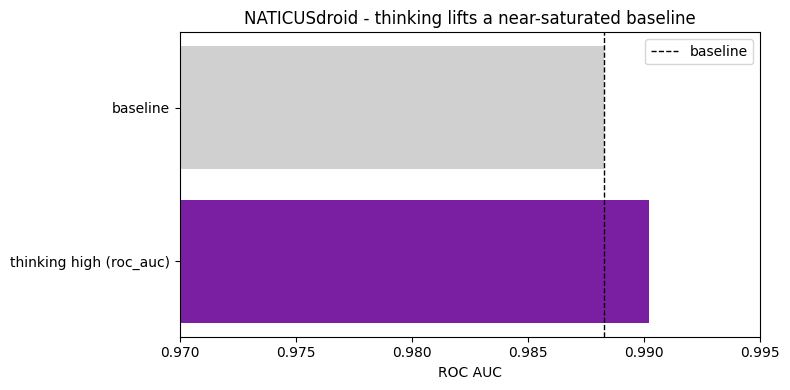
House Sales: a Harder Target
Does the gain hold on a noisier problem? The house sales dataset predicts the sale price of homes in King County, Washington, from 21 features describing size, rooms, condition and location (21,613 sales). The baseline leaves more headroom than diamonds (R² around 0.94), so we check whether thinking delivers a similar gain here.Load the data
Baseline
Thinking mode
The lever that moves the needle most here.Results
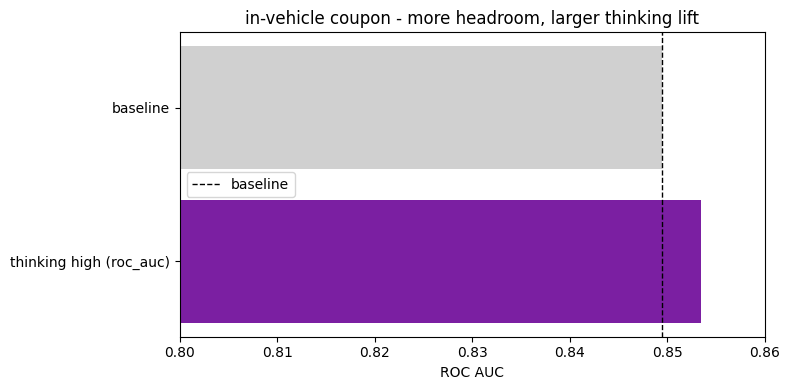
Takeaways
- Thinking mode is the simplest lever. One flag (
thinking_mode=True, orthinking_effort="high"as here) reduced RMSE, MAE and lifted R² on both datasets, with no feature engineering or tuning. - The gain is consistent. RMSE fell by 1.6% on diamonds and 1.5% on house sales, so the strong baseline did not cap the improvement. Thinking never hurt a metric here.
- It runs on the hosted client and the compute is paid once, at fit time. Every prediction afterwards benefits, so reach for it first.